XTREAMER EXPRSS / XTREAMER EXPRESS LIGHT FIRMWARE UPGRADE

[vc_row][vc_column][vc_custom_heading text=”การอัพเกรด เฟิมแวร์ XTREAMER EXPRESS” font_container=”tag:h2|text_align:center” use_theme_fonts=”yes”][/vc_column][/vc_row][vc_row css=”.vc_custom_1525025882934{border-top-width: 1px !important;border-right-width: 1px !important;border-bottom-width: 1px !important;border-left-width: 1px !important;border-left-color: #0c0c0c !important;border-right-color: #0c0c0c !important;border-top-color: #0c0c0c !important;border-bottom-color: #0c0c0c !important;}”][vc_column width=”1/2″ css=”.vc_custom_1525027476990{border-top-width: 1px !important;border-right-width: 1px !important;border-bottom-width: 1px !important;border-left-width: 1px !important;border-left-color: #0c0c0c !important;border-left-style: solid !important;border-right-color: #0c0c0c !important;border-right-style: solid !important;border-top-color: #0c0c0c !important;border-top-style: solid !important;border-bottom-color: #0c0c0c !important;border-bottom-style: solid !important;border-radius: 1px !important;}”][vc_single_image image=”2359″ img_size=”medium”][vc_column_text]

XTREAMER EXPRESS FIRMWARE เท่านั้น

อุปกรณ์ที่ต้องเตรียมก่อน Update

1.คอมพิวเตอร์ที่ต่อเน็ตไว้

2. Flash Drive ที่ format เป็น FAT32

local upgrade express OTA v1.2.4.1208A Beta

https://mega.nz/#F!k0sRBKwL!stp83Xu7eaJz-u4furGw6g

เครื่อง Xtreamer Express จะตัวเครื่องใหญ่สีขาว ถ้าใช้ให้โหลดเลยครับ ห้ามโหลดผิดรุ่น

โหลดไฟล์อัพเดดนี้ลงเครื่องคอมพิวเตอร์ จะต้องได้ไฟล์ชื่อ update.zip แล้วนำไฟล์นี้ ไปใส่ในแฟลชไดร์

จากนั้น นำไปใส่เสียบ ช่อง USB2.0 เท่านั้น รูใดก็ได้

(ภาพด้านล่างเป็นตัวอย่าง Xtreamer lightรุ่นเล็ก ซึ่งอาจมีบางเมนูแตกต่างกันได้บ้าง )

จากนั้นกด local update >>

ถ้าทำถูกต้องจะมีคำถามว่ากด อัพเดดหรือไม่ ให้ทำการอัพเดด เครื่องจะทำการอัพเดดนาน 15-20 นาที และรีบูทเครื่องใหม่ครับ

ถ้าไม่ถูกต้องจะกดอัพเดดไมไ่ด้ ให้เช็คใหม่ครับ

[/vc_column_text][vc_zigzag][vc_column_text]

วิธีที่ 2 .Upgrade หรือสามารถ Downgrade ได้

XTREAMER EXPRESS FIRMWARE เท่านั้น ในกรณีที่เปิดเครื่องเข้าหน้าเมนูปกติไมไ่ด้

ให้คำแนะนำเฉพาะลูกค้า ที่ซื้อสินค้าจาก PEAKHD เท่านั้น

อุปกรณ์ที่ต้องเตรียมก่อน Update

1.คอมพิวเตอร์ที่ต่อเน็ตไว้

2. Flash Drive ที่ format เป็น FAT32

express usb v1.2.4.1130 Official แนะนำ
https://mega.nz/#F!okFA0YBD!_GHFRBsU5E1RsCSKV1eU-Q


เครื่อง Xtreamer Express จะตัวเครื่องใหญ่สีขาว ถ้าใช้ให้โหลดเลยครับ ห้ามโหลดผิดรุ่น

โหลดไฟล์อัพเดดนี้ลงเครื่องคอมพิวเตอร์ จะต้องได้ไฟล์ชื่อ update.zip แล้วนำไฟล์นี้ ไปใส่ในแฟลชไดร์

จากนั้น นำไปใส่เสียบ ช่อง USB2.0 เท่านั้น รูใดก็ได้

(ภาพด้านล่างเป็นตัวอย่าง Xtreamer lightรุ่นเล็ก ซึ่งอาจมีบางเมนูแตกต่างกันได้บ้าง )


ให้เปิดเครื่องขึ้นมา 1 ครั้งครับ แล้วกดปุ่มสีเงินหน้าเครื่องปิดเครื่อง โดยเสียบ Flash drive ต่อสาย HDMI ต่อไฟ ไว้และเตรียมการอัพเดด

  • จากนั้นให้ทำการกดค้างที่ปุ่ม Power Button ครับ ( ปุ่มสีเงินหน้าเครื่อง)
  • ค้างจนกว่าจะขึ้นหน้าอัพเดด ที่เป็น Status ตัว % ในการอัพขึ้นมา ค่อยปล่อยมือจากปุ่ม power
  • เครื่องจะอัพเดดจนเสร็จครับ

[/vc_column_text][/vc_column][vc_column width=”1/2″][vc_zigzag][vc_single_image image=”1952″ img_size=”medium”][vc_column_text]

XTREAMER LIGHT FIRMWARE เท่านั้น


อุปกรณ์ที่ต้องเตรียมก่อน Update

1.คอมพิวเตอร์ที่ต่อเน็ตไว้

2. Flash Drive ที่ format เป็น FAT32

Local update express light OTA v1.2.0.1211

https://mega.nz/#F!E8EXxZSZ!Hg0sZUwzgMSvdtTCI3U2Mw

โหลดไฟล์อัพเดดนี้ลงเครื่อง จะต้องได้ไฟล์ชื่อ update.zip แล้วนำไฟล์นี้ ไปใส่ในแฟลชไดร์

จากนั้น นำไปใส่เสียบ ช่อง USB2.0 เท่านั้น รูใดก็ได้

จากนั้นกด local update >>

ถ้าทำถูกต้องจะมีคำถามว่ากด อัพเดดหรือไม่ ให้ทำการอัพเดด เครื่องจะทำการอัพเดดนาน 15-20 นาที และรีบูทเครื่องใหม่ครับ

ถ้าไม่ถูกต้องจะกดอัพเดดไมไ่ด้ ให้เช็คใหม่ครับ


[/vc_column_text][vc_zigzag][/vc_column][/vc_row]

Zidoo X9s Realtek 1295DD รีวิว Review และเหตุผลว่าทำใมจึงเป็น Player ที่ทุกคนเลือกซื้อ

Zidoo X9s Realtek 1295DD รีวิว Review และเหตุผลว่าทำใมจึงเป็น Player ที่ทุกคนเลือกซื้อ

[vc_row][vc_column][vc_message]

ZIDOO X9s สินค้าคุณภาพ ที่คอเล่นหนัง HD Player ส่วนใหญ่เลือกใช้

[/vc_message][vc_video link=”https://www.youtube.com/watch?v=d197XFDmEN8″ align=”center”][/vc_column][/vc_row][vc_row][vc_column][vc_column_text]

Zidoo X9s Realtek1295 มาใหม่ด้วย

ขุมพลัง จาก Chip Realtek HD Player , Android Box 

การมาของ Zidoo x9s ครั้งนี้ ดีในด้านของ Spec ที่เป็นรุ่นแรกเลย

ที่เอา Chipset Realtek RTD1295 เข้ามาใช้งาน

อีกทั้งยังอัดแน่นมาด้วย สเปคเครื่อง Quadcore จาก Realtek ตัวใหม่

จุดน่าสนใจคือ มาพร้อมกับ Android Version 6.0

และยัง มาพร้อมกับ SATA Port สำหรับเสียบ Harddisk ขนาด 3.5 นิ้วได้ด้วย

สิ่งที่ทำให้เครื่องนี้พิเศษคือ นอกจากจะเล่น กล่องแบบ Android Box ได้แล้ว ยังเป็น HD Player ได้อีก

เพราะรองรับเสียง AVR DTS-HDMA 7.1 CH

นอกจากนี้แล้ว ปัญหาเรื่อง Subtitle ที่เจอกับกล่อง Android บางรุ่น จะหมดไป ด้วย Chipset Realtek

ทำให้รุ่นนี้ ดูน่าใช้งานขึ้น สเปคจัดเต็มด้วย Ram 2 GB และ Rom 16 GB ท่านใดเป็นคอหนังตัวยง

และ IPTV ไม่ควรพลาดด้วยประการทั้งปวงครับ

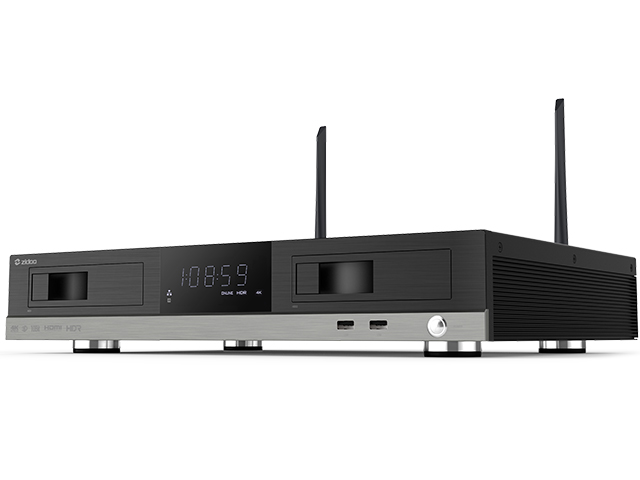
ด้านข้างตัวเครื่อง และด้านหน้า มีจอแสดงผล Display เวลา

ด้านหลังเครื่อง

1. ไล่จากทางซ้าย และขวาสุด คือที่เสียบเสา Wifi

2.ถัดมาจากซ้ายคือ Gigabit Lan !

3.ต่อมาคือ HDMI out ที่จะ out ภาพออก TV

4.HDMI in มีหน้าที่ในการส่งสัญญาณจากที่อื่นเข้าเครื่อง

5.AV สำหรับ จอ 3 สี ก็ ยังมีมาให้

6.Optical port ก็มาให้สำหรับต่อเครื่องเสียง

7.Restore คือ ปุ่มสำหรับ รีเซ็ตเครื่องและ Up firmware

8.DC ให้มา 12 V ถือว่าทำมาได้ดี เพื่อเลี้ยงไฟสำหรับ HDD 3.5 นิ้ว

9.นอกจากนี้ ยังมี ปุ่ม power off / on มาด้วย

ด้านข้าง

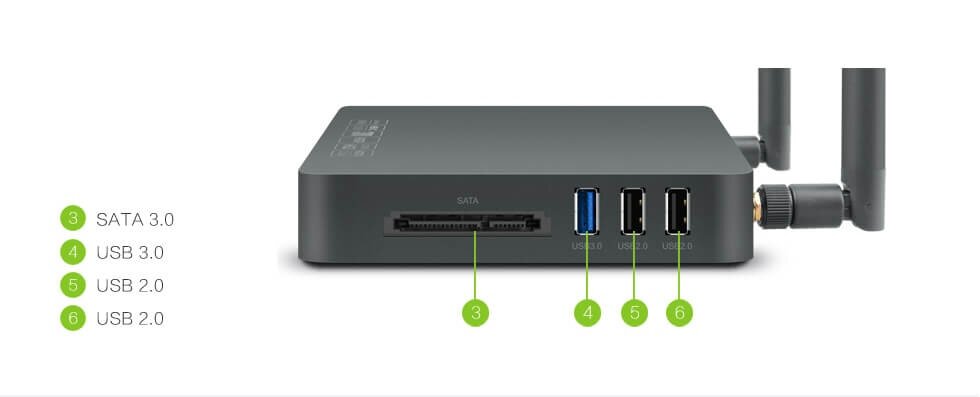
1. Sata port ใส่ Harddisk internal ได้ !

2.USB 3.0 x 1 ,USB 2.0 x 2

ช่วยทำให้โอนถ่ายข้อมูลไวขึ้น ถ้าท่านใช้ USB 3.0

Appearance

X9S spec

X9S spec
X9S spec


-เล่นเมนู หนัง Bluray ได้สมบูรณ์แบบ-


-สำหรับการจำหน่ายในปัจจุบันนั้น-

รับประกันศูนย์ไทย จาก Zidoo Thailand โดย PEAKHD

เลือกซื้อสินค้าต้องวอยประกันระบุชัดเจนจาก “peakhdplayer” เท่านั้น


คำเตือน ” มีหลายร้านที่หิ้วเข้ามาแบบผิดกฏหมาย และไม่ได้รับสินค้าโดยตรงจาก Zidoo”

การรับประกันจะแตกต่าง และเป็นสินค้าผิดกฏหมาย


เลือกซื้อสินค้าต้องกรุณาดูวอยประกันระบุชัดเจนจาก “peakhdplayer” เท่านั้น

ผู้นำเข้าสินค้าโดยตรง สังเกตที่ใต้เครื่อง


peakhdshop with brand1.jpg

ประกัน PEAKHD.PNG

ใบตัวแทนนำเข้า zidoo.jpg

[/vc_column_text][vc_btn title=”สั่งซื้อ Zidoo X9s ตอนนี้ !” style=”3d” color=”danger” size=”lg” align=”center” button_block=”true” link=”url:https%3A%2F%2Fbeelinkthailand.com%2Fproduct%2Fzidoo-x9s-realtek-1295%2F||target:%20_blank|”][/vc_column][/vc_row]

ZIDOO เผย Spec แล้วของ Zidoo X20 กับ X20 Pro อย่างแน่นอนแล้ว

ZIDOO เผย Spec แล้วของ Zidoo X20 กับ X20 Pro อย่างแน่นอนแล้ว

[vc_row][vc_column][vc_column_text]

ZIDOO เผย Spec HD PLAYER 4K ของ Zidoo X20 กับ X20 Pro อย่างแน่นอนแล้ว

[/vc_column_text][/vc_column][/vc_row][vc_row][vc_column][vc_column_text]

เริ่มจากข่าวคราวของ Realtek 1296DD ที่เป็นโมเดลประกอบ ทียังไม่ขึ้นรูปร่างเป็นผลิตภัณฑ์เมื่อปีที่แล้ว

ในตอนนี้ X20 และ X20 Pro หลุด Spec มาแล้วดังนี้

[/vc_column_text][vc_video link=”https://www.youtube.com/watch?v=XVkEd_tN820″ el_width=”60″ align=”center”][vc_single_image image=”2214″ img_size=”large” alignment=”center”][vc_single_image image=”2213″ img_size=”large” alignment=”center”][/vc_column][/vc_row][vc_row css=”.vc_custom_1524845187362{border-top-width: 1px !important;border-right-width: 1px !important;border-bottom-width: 1px !important;border-left-width: 1px !important;border-left-color: #1e73be !important;border-left-style: solid !important;border-right-color: #1e73be !important;border-right-style: solid !important;border-top-color: #1e73be !important;border-top-style: solid !important;border-bottom-color: #1e73be !important;border-bottom-style: solid !important;border-radius: 1px !important;}”][vc_column width=”1/2″ css=”.vc_custom_1524845110993{border-top-width: 1px !important;border-right-width: 1px !important;border-bottom-width: 1px !important;border-left-width: 1px !important;border-left-color: rgba(53,14,114,0.54) !important;border-left-style: solid !important;border-right-color: rgba(53,14,114,0.54) !important;border-right-style: solid !important;border-top-color: rgba(53,14,114,0.54) !important;border-top-style: solid !important;border-bottom-color: rgba(53,14,114,0.54) !important;border-bottom-style: solid !important;border-radius: 2px !important;}”][vc_column_text]

ZIDOO X20

Powerful Configuration
430MM Standard cabinet Size, All aluminum alloy chassis
New upgrade version Realtek 1296 Quad-Core 64 digits A53 processor,High
quality high-power SMPS.

2G DDR4 Memory,16GB eMMC Super Built-in Storage,gigabit wired, 802.11
AC 2T2R 867Mbps WIFI,Bluetooth 4.2

Abundant Interface :
X20 : SATA 3.0*2, USB 2.0*2, USB 3.0*1, TYPEC *1, Coaxial Cable*1, Optical
Fiber*1 , Left/Right Channels*1, AV Output*1, Infrared Input*1, RS232*1, HDMI
OUT*2, HDMI IN 2.0*1

Full function with backlight Bluetooth-Infrared-Learning three-in-one remote
control, remote control without dead Angle.

Super Lager front LED Display.
Independent Dual SATA 3.0 Ports, NSS Patented metal hard disk extractor can

Build-in two High-Capacity Hard Disk.
Smart temperature control with dual Balls and High Static Pressure Fan.

Dual HDMI Output ports (Audio and Video Separation) dispense with origin
power amplifier and enjoy 4K with HD Audio.

Newquality optimization engine technology,Optimized HDR to SDR Algorithm.
Play 4K HDR which Restoring primitive color even without HDR TV.
Detailed Frame switching and resolution switching. (23.976,59.94,25,30,50,60)

4K 60P Point to Point Output, Color Region: HDR/HDR10, 10Bit Color Depth,
10.7 hundred million kind of colors.

True 4K 60P decode, H.265/HEVC 10Bit Hard solution.
Support 4K UHD Blue-Ray Navigation
Powerful subtitle function, Support random change any fonts with different
color effects; Support download subtitle online; Support SUP&ASS special

effects subtitles
Unparalleled Wall-Poster Function, Full automatic scan, Automatic classification
and sorting movies and dramas. Customer Layout.
Soundtrack support SACD, DFF, DSF, APE, FLAC, WAV and etc Free lossless
audio formats;

Support CUE track; Support cell phone control without having
to open the display device to listen to music.

Support NFS,SMB,V2,SMB V1 multiple shared protocols.

Support HTTP , RS232(Control on-off), Control4 Multiple ways to control.

[/vc_column_text][/vc_column][vc_column width=”1/2″][vc_column_text]

ZIDOO X20 PRO

Powerful Configuration
430MM Standard cabinet Size, All aluminum alloy chassis
New upgrade version Realtek 1296 Quad-Core 64 digits A53 processor,High
quality high-power SMPS.

4G DDR4 Memory,32GB eMMC Super Built-in Storage,gigabit wired, 802.11
AC 2T2R 867Mbps WIFI,Bluetooth 4.2

Abundant Interface :
X20 : SATA 3.0*2, USB 2.0*2, USB 3.0*1, TYPEC *1, Coaxial Cable*1, Optical
Fiber*1 , Left/Right Channels*1, AV Output*1, Infrared Input*1, RS232*1, HDMI
OUT*2, HDMI IN 2.0*1

ESS 9038 Professional DAC Audio processing Chip


Full function with backlight Bluetooth-Infrared-Learning three-in-one remote
control, remote control without dead Angle.

Super Lager front LED Display.
Independent Dual SATA 3.0 Ports, NSS Patented metal hard disk extractor can

Build-in two High-Capacity Hard Disk.
Smart temperature control with dual Balls and High Static Pressure Fan.

Dual HDMI Output ports (Audio and Video Separation) dispense with origin
power amplifier and enjoy 4K with HD Audio.

Newquality optimization engine technology,Optimized HDR to SDR Algorithm.
Play 4K HDR which Restoring primitive color even without HDR TV.
Detailed Frame switching and resolution switching. (23.976,59.94,25,30,50,60)

4K 60P Point to Point Output, Color Region: HDR/HDR10, 10Bit Color Depth,
10.7 hundred million kind of colors.

True 4K 60P decode, H.265/HEVC 10Bit Hard solution.
Support 4K UHD Blue-Ray Navigation
Powerful subtitle function, Support random change any fonts with different
color effects; Support download subtitle online; Support SUP&ASS special

effects subtitles
Unparalleled Wall-Poster Function, Full automatic scan, Automatic classification
and sorting movies and dramas. Customer Layout.
Soundtrack support SACD, DFF, DSF, APE, FLAC, WAV and etc Free lossless
audio formats;

Support CUE track; Support cell phone control without having
to open the display device to listen to music.

Support NFS,SMB,V2,SMB V1 multiple shared protocols.

Support HTTP , RS232(Control on-off), Control4 Multiple ways to control.

[/vc_column_text][/vc_column][/vc_row][vc_row][vc_column][vc_single_image image=”2716″ img_size=”large” alignment=”center”][/vc_column][/vc_row][vc_row][vc_column][vc_message]ทาง Admin ของทาง PEAKHD ได้สอบถามไปที่ Zidoo ได้เรื่องความแตกต่างของ Ram และ Rom รวมถึง ตัว X20 ธรรมดา จะถูกตัด DAC ซึ่งเป็นตัวชิพเซ็ตที่ช่วยเรื่องเสียง ที่ดีกว่าทั่วๆไป ในระดับที่ดีมากที่สุด เป็นชิพเซ็ตเรือธงเลยก็ว่าได้ อยุ่ในตระกุลเครื่องเล่นสูงๆ ของ 4K Bluray และ AVR หลายๆรุ่น ในตอนนี้ X20 Pro ได้ใช้ชิพเซ็ตตัวนี้ ชูเป็นจุดขายสำคัญ ฉะนั้นท่านที่มีชุดโฮมและ การฟังเพลงคือชีวิตของท่าน ท่านเลือกไม่ผิดแล้วกับ X20 Pro

ส่วนท่านใดที่ไม่ต้องการเน้นด้านนี้เท่าไหร่นัก X20 ตัวธรรมดาก็ตอบโจทย์การเล่นหนัง Player ทั่วๆไปได้แล้ว

จากข้อมูลของทาง http://www.esstech.com

The ES9038PRO SABRE DAC

Bringing Music to Life

The  ES9038PRO SABRE DAC is the flagship of the ESS PRO series. It sets a new benchmark for audio excellence with the industry’s highest dynamic range (DNR), up to 140dB, in a 32-bit, 8-channel DAC. The ES9038PRO was designed for premium home theater equipment including Blu-ray players, preamplifiers, all-in-one A/V receivers, and more. For serious audiophiles it provides the most immersive listening experience — bringing music to life. 

The ES9038PRO SABRE DAC also features ESS’ patented 32-bit HyperStreamDAC technology with-122dB total harmonic distortion plus noise (THD+N). The HyperStream architecture is responsible for both the outstanding sound quality of the ES9038 and the extremely low THD+N. A typical competitive, 32-Bit 8-Channel DAC using a delta-sigma architecture features-107dB THD+N (0.0004%), which when subjected to listening tests does not equal the clarity and sound stage of the ES9038PRO. 

[/vc_message][/vc_column][/vc_row][vc_row][vc_column][vc_single_image image=”2728″ img_size=”large” alignment=”center”][/vc_column][/vc_row]

Beelink Manual

[vc_row][vc_column][vc_column_text]

การใช้งาน Beelink เบื้องต้น 

1.ให้ทำการต่อ สายไฟ adapter เข้ากับ Power port

2.ให้ทำการเสียบช่องสาย HDMI port จากเครื่อง Beelink เข้าสู่ จอทีวี


[/vc_column_text][vc_custom_heading text=”Video การใช้งานเบื้องต้น Beelink

โดยที่ในคลิปนี้อธิบายการใช้งาน App รายเดือน FWHD เบื้องต้นให้ด้วย” font_container=”tag:h2|text_align:center”][vc_video link=”https://youtu.be/UtYcrUH7-nE”][vc_custom_heading text=”Video การใช้งาน Air mouse” font_container=”tag:h2|text_align:center”][vc_video link=”https://www.youtube.com/watch?v=DzjTokedLdQ”][/vc_column][/vc_row]

Dune HD PRO 4K มาแล้วในตอนนี้ พร้อม Chipset ใหม่คือ Realtek 1295DD Android 7.1 !

Dune HD PRO 4K มาแล้วในตอนนี้ พร้อม Chipset ใหม่คือ Realtek 1295DD Android 7.1 !

[vc_row][vc_column][vc_column_text]

DUNE HD PRO 4K กับ HD PLAYER 4K ล่าสุด ปี 2018

[/vc_column_text][vc_message]มาแล้วกับ SPEC ของ Dune HD Pro 4K ที่ทาง PEAKHD จะนำเข้ามาจำหน่ายอย่างเป็นทางการ

แน่นอนว่าตัวเครื่องนั้น มาพร้อมกับ Realtek 1295DD ใหม่ พร้อมด้วยตัวเครื่องอะลูมีเนียม

ส่วนการใช้งานจะเป็นอย่างไรนั้นทาง PEAKHD จะจัดมารีวิวให้ชม ด้านล่างนี้เลยครับ[/vc_message][vc_single_image image=”2660″ img_size=”large” alignment=”center” style=”vc_box_shadow_3d”][vc_single_image image=”2638″ img_size=”large” style=”vc_box_shadow_3d”][vc_row_inner][vc_column_inner width=”1/2″][vc_single_image image=”2699″ img_size=”medium” alignment=”center” style=”vc_box_shadow_3d”][vc_single_image image=”2701″ img_size=”medium” alignment=”center” style=”vc_box_shadow_3d”][/vc_column_inner][vc_column_inner width=”1/2″][vc_single_image image=”2702″ img_size=”medium” alignment=”center” style=”vc_box_shadow_3d”][vc_single_image image=”2700″ img_size=”medium” alignment=”center” style=”vc_box_shadow_3d”][/vc_column_inner][/vc_row_inner][vc_video link=”https://www.youtube.com/watch?v=03zcF_DMlzU” align=”center”][vc_column_text]

Media processor: Realtek RTD1295 SoC ที่แตกต่างจาก Realtek รุ่นอื่น

  • 4K support: 4Kp60 video decoding, 4Kp60 video output, 4K HEVC 10-bit, HDR, HDMI 2.0a
  • RAM: 2 GB
  • Flash memory: 16 GB
  • Connectors: 1x USB 3.0 host, 2x USB 2.0 host, external SATA port (data+power), HDMI 2.0a, composite video, RCA analog stereo audio, optical S/PDIF, Ethernet 10/100/1000 Mbit/s, HDMI 2.0 input, 12V DC IN
  • Ethernet: 10/100/1000 Mbit/s
  • Wi-Fi: 802.11b/g/n/ac, Dual Band 2.4/5GHz, 2T2R
  • Bluetooth: Bluetooth 4.2
  • Front panel display: Multi-segment VFD
  • Media sources: External HDDs (USB, SATA), USB devices (USB flash drive, USB card reader, etc), built-in micro SD card slot, PC and NAS in local network (SMB, NFS, UPnP/DLNA, HTTP), other Internet and local network media sources
  • Video codecs: MPEG2, MPEG4, XVID, WMV9, VC1, H.264, H.265, H.265 10-bit, VP9; support for very high bitrate video (up to 100 Mbit/s and higher)
  • Video file formats: MKV, MPEG-TS, MPEG-PS, M2TS, VOB, AVI, MOV, MP4, QT, ASF, WMV, BD ISO, BDMV, DVD-ISO, VIDEO_TS
  • 3D video formats: MVC, Side-by-side, Top/Bottom
  • 4K video formats: H.265 up to 4Kp60 HDR, H.265 10-bit up to 4Kp60 HDR, H.264 up to 4Kp24
  • Video output modes: Wide range of supported output resolutions and framerates (up to 4Kp60)
  • Video output framerate: Automatic (according to the played content) and manual; 23.976 Hz support
  • Audio codecs: MPEG-1/2 layer I/II/III, AAC, LPCM, WMA, WMAPro, FLAC, multichannel FLAC, Vorbis, WavPack, APE (Monkey’s Audio), ALAC (Apple lossless), SACD (Super Audio CD), AC3 (Dolby Digital), DTS
  • Audio file formats: MP3, MPA, M4A, AAC, WAV, WMA, FLAC, Ogg/Vorbis, WavPack, APE (Monkey’s Audio), ALAC (Apple lossless), SACD (Super Audio CD), AC3, DTS, DTS-WAV
  • Subtitle formats: SRT (external), SUB (MicroDVD) (external), text (MKV), SSA/ASS (MKV, external), VobSub (MP4, MKV, external SUB/IDX), PGS (Blu-ray, TS, MKV)
  • Picture file formats: JPEG, PNG, BMP, GIF
  • Playlist file formats: M3U, PLS, CUE
  • Photo viewer functions: Slideshow, transition effects, picture rotation, zoom, browse playlist, repeat, shuffle
  • Network file browsing: SMB client and browser, NFS client, UPnP/DLNA client and browser
  • Applications: Dune HD applications (install from file or app store), Android applications (install from file or app store)
  • Plugins and extensions: Full support for Dune HD PHP plugins API, Dune HD skins, dune_folder.txt mechanism
  • Filesystems: FAT16/FAT32 (read-write), EXT2/EXT3/EXT4 (read-write), NTFS (read-write), exFAT (read-write), HFS/HFS+ (Mac OS Standard/Extended) (read-only), BTRFS (read-write)
  • Widevine DRM: Widevine DRM L3 / L1
  • Android OS: Android 6.0.1 / 7.1
  • RCU: Premium IR RCU with learning function and backlight function (based on laser carving technology)
  • Power: 12V DC, 3A
  • Dimensions (W x H x D): 187mm x 29mm x 140mm

ขณะนี้ทาง พีค เอชดี ได้สั่งซื้อโดยตรงจากบริษัท Dune ที่ไต้หวัน

ได้รับใบอนุญาตนำเข้า จำหน่าย กสทช. เลขที่ 081260000174 บริษัท พีค เอชดี มีเดีย จำกัด

นำเข้าอย่างถูกต้องตามกฏหมายและเสียภาษีอย่างถูกต้อง โดย บริษัท พีค เอชดี มีเดีย จำกัด (รับประกันสินค้า 1 ปี)

กรณีที่ต้องการซื้อ Mini keyboard+ เพิ่มเพียง 250 หรือ Air mouse c120 + เพิ่มเพียง 250 บาท เท่านั้น

.[/vc_column_text][/vc_column][/vc_row][vc_row][vc_column][vc_btn title=”สั่งซื้อ Dune HD Pro 4K ตอนนี้!” style=”3d” color=”danger” size=”lg” align=”center” button_block=”true” link=”url:https%3A%2F%2Fbeelinkthailand.com%2F%25e0%25b8%25ab%25e0%25b8%2599%25e0%25b9%2589%25e0%25b8%25b2%25e0%25b8%25aa%25e0%25b8%25b4%25e0%25b8%2599%25e0%25b8%2584%25e0%25b9%2589%25e0%25b8%25b2%25e0%25b8%25a3%25e0%25b8%25a7%25e0%25b8%25a1%2F|||”][/vc_column][/vc_row]