by myadmin | Feb 20, 2019 | Uncategorized, Review สินค้า, ข่าวสาร Update ใหม่
ในงาน CES 2017 ที่ผ่านมา บริษัท Rockchip ได้นำเสนอชิปหนึ่งใน RK33xx Series นั่นก็คือ Rockchip RK3399 ซึ่งทางผู้ผลิตได้ประกาศว่าชิปตัวนี้จะปรากฎในกล่องทีวี พร้อมกับ SoC ใหม่
เมื่อธันวาคมที่ผ่านมา มีข่าวเกี่ยวกับกล่องทีวีที่จะมาใหม่จาก UGOOS เรียกว่า UT5 และ Vorke Z3 ซึ่งจะมีการติดตั้ง RK3399 เข้าไปด้วย แต่ยังไม่มีวันที่ระบุแน่นอนออกมาให้ทราบกัน
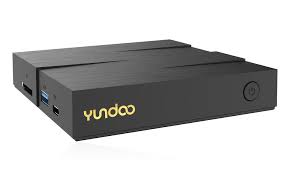
ในขณะที่บริษัท YUNDOO ซึ่งมีความเชี่ยวชาญในการผลิต, พัฒนากล่องทีวีและอุปกรณ์อิเล็กทรอนิกส์อื่น ๆ และรู้จักกันดีทั่วโลก ได้นำเสนอกล่องทีวีรุ่นใหม่ออกมา คือ YUNDOO Y8 ซึ่งแน่นอนว่าต้องประกอบด้วย Rockchip RK3399 อย่างแน่นอน
RK3399 เป็นหน่วยประมวลผลที่มีประสิทธิภาพด้วย 2 Cortex A72 cores clocked ที่ 2.0 GHz ขึ้นไป และ 4 Cortex A53 ร่วมกับ Mali-T860MP4 GPU
หน่วยประมวลผลนี้ยังสามารถรองรับวิดีโอ 4K H.265 ถอดรหัสได้ถึง 60 fps, HDMI 2.0 video output และ Gigabit Ethernet อีกด้วย
Android TV Box YUNDOO Y8 นี้มีวางจำหน่ายแบบ presale แล้วที่ Gearbest (จะเริ่มจัดส่งหลังจากวันที่ 2 มีนาคม 2560) โดยมี 2 รุ่นด้วยกัน คือ 2GB RAM / 16GB eMMC ราคาอยู่ที่ $110.73 และ 4GB RAM / 32GB eMMC ราคา $144.17
Y8 TV Box ในรุ่น 4GB RAM / 32GB eMMC เป็นสเปคที่มีประสิทธิภาพค่อนข้างดีสำหรับ Android TV Box และสามารถใช้ได้ในระบบปฏิบัติการ Android 6.0.1 ซึ่งมีรายละเอียดเพิ่มเติม ดังนี้
ข้อมูลจำเพาะของ YUNDOO Y8 TV Box :
- CPU – Rockchip RK3399 processor with 2x ARM Cortex A72 cores @ up to 2.0 GHz, 4x ARM Cortex A53 cores
- GPU – Quad-core ARM Mali-T860MP4 GPU
- Memory – 2GB or 4GB DDR3
- Storage – 16GB or 32 GB eMMC flash + SD card slot
- Video Output – HDMI 2.0a up to 4K @ 60 Hz
- Video Codecs – 4K H.265 & VP9 decoding
- Audio Output – HDMI, optical S/PDIF
- Connectivity – Gigabit Ethernet, dual band 802.11 b/g/n/ac WiFi + Bluetooth 4.0
- USB – 2x USB 2.0 ports, 1x USB 3.0 port, 1x USB 3.1 type C port with data and video support
- Misc – Power button, reset port
- Power Supply – 5V
- Dimensions – 11.60 x 11.60 x 2.35 cm
- Weight – 290 grams
ภายในกล่องของ YUNDOO Y8 คุณจะได้รับ YUNDOO Y8 TV Box Power Adapter, Remote Control, HDMI Cable, English User Manual อีกด้วย
by myadmin | Feb 20, 2019 | ข่าวสาร Update ใหม่
ปัจจุบันมี TV Boxes มากมายที่ใช้ Rockchip RK3399 และวันนี้ก็มีอีกหนึ่ง TV Box มานำเสนอเช่นกัน นั่นคือ “Sunchip” (Shenzhen Sunchip Technology Co., Ltd.) Sunchip CX-R99 Sunbox มีสเปคที่ดี มี 4 GB of RAM และ 32 GB of flash storage

TV Box รุ่นนี้มีจำหน่ายที่ Sunchip website on Alibaba.com ราคาอยู่ที่ $110-140 ขึ้นอยู่กับระยะเวลาของสัญญา ข้อเสนอขึ้นตรงกับผู้จัดจำหน่าย และรายละเอียดเพิ่มเติมของ Sunchip CX-R99 มีดังนี้
Sunchip CX-R99 Sunbox Android TV Box:
- CPU – Rockchip RK3399 processor with 2x ARM Cortex A72 cores @ up to 2.0 GHz, 4x ARM Cortex A53 cores
- GPU – Quad-core ARM Mali-T860MP4 GPU
- Memory – 4GB DDR3
- Storage – 32GB eMMC flash + micro SD card slot
- Storage Extension – Support SATA, 2.5 Inch or 3.5 Inch, Max 8TB, MicroSD (TF) card, Max to 256GB
- OS – Android 6.0.1
- Video Output – HDMI 2.0a up to 4K @ 60 Hz
- Video Codecs – 4K H.265 & VP9 decoding
- Audio Output – HDMI, optical S/PDIF
- Connectivity – Gigabit Ethernet, dual band 802.11 b/g/n/ac WiFi + Bluetooth 4.0
- USB – 1x USB 2.0 ports, 1x USB 3.0 port, 1x USB 3.1 type C port with data and video support
- Misc – Power button
- Power Supply – 12V/2A
- Dimensions & Weight – n/a

นอกจากนี้ยังจะหาข้อมูลเพิ่มเติมได้ที่ Sunchip website
by myadmin | Feb 20, 2019 | ข่าวสาร Update ใหม่
ทุกวันนี้มี TV Box หลากหลายแบรนด์ที่หันมาใช้ SoC จาก Rockchip นั่นคือ Rockchip RK3399 และ TV Box อย่าง R-TV BOX K99 เองก็ใช้ชิปตัวนี้ด้วยเช่นกัน
R-TV BOX K99 มีตัวเคสภายนอกเหมือนกับรุ่น T96Z from Unuiga แต่ T96Z มีสเปคที่สูงกว่า แต่คุณก็ไม่สามารถปฏิเสธเจ้า R-TV BOX K99 ได้เช่นกัน R-TV BOX K99 ตัวนี้มี 4GB of RAM และ 32GB eMMC flash storage ถ้าคุณกำลังมองหา TV Box ที่มีประสิทธิภาพ ถือได้ว่าตัวนี้ก็น่าสนใจไม่ใช่น้อย ซึ่งตอนนี้มีวางขายที่ Geekbuying ราคา $139.99 + ฟรีค่าจัดส่ง และยังทำงานบนระบบปฏิบัติการ Android 6.0 (typically) รายละเอียดเพิ่มเติม มีดังนี้
ข้อมูลจำเพาะของ R-TV BOX K99:
- CPU – Rockchip RK3399 hexa core processor with 2x ARM Cortex A72 cores @ up to 2.0 GHz, 4x ARM Cortex A53 cores

- GPU – Mali-T860MP4 GPU @ 800 MHz with support for OpenGL ES1.1/2.0/3.0/3.1, OpenVG1.1, OpenCL, DX11, AFBC (frame buffer compression)
- Memory – 4GB DDR3
- Storage – 32GB eMMC 5.1 flash + micro SD card slot
- Video Output – HDMI 2.0 up to 4K @ 60 Hz
- Video Codecs – 4K 10-bit H.265, H.264 & VP9 decoding up to 60 fps
- Audio Output – HDMI, optical S/PDIF
- Connectivity – Gigabit Ethernet, Dual Band 802.11 b/g/n/ac WiFi (867 Mbps) + Bluetooth 4.0
- USB – 1x USB 2.0 port, 1x USB 3.0 port, 1x USB type C port with OTG mode, and DisplayPort 1.2 video/audio support
- Misc – Power button, recovery port
- Power Supply – 5V/2.5A
- Dimensions & Weight – N/A
- Material – Aluminium alloy & ABS
ในแพคเกจประกอบด้วย TV Box, Remote control, Power adapter, HDMI cable, คู่มือการใช้งาน และนอกจากนี้ยังมีรุ่นเทียบเคียงอีกด้วย นั่นก็คือ CSA96 TV Box แต่ถึงอย่างไรก็ยังอยากให้คุณได้ลอง R-TV BOX K99 กัน เพราะดูจากสเปคแล้วน่าสนใจทีเดียว
by myadmin | Dec 19, 2018 | ข่าวสาร Update ใหม่
[vc_row][vc_column][vc_single_image image=”3777″ img_size=”full”][/vc_column][/vc_row]
by myadmin | Dec 12, 2018 | Tip วิธีใช้งาน, TIP-Zidoo, ข่าวสาร Update ใหม่
[vc_row][vc_column][vc_message]NETFLIX สำหรับ Zidoo Z9s Z10 x9s x10 x20 x20 Pro
นี้เป็นเวอชั่นที่ใช้ได้ครับ ความละเอียดที่ได้ 720-1080P เท่านั้น
เนื่องจาก netflix บล๊อคการเข้าถึงจากหลายแบรนกล่องแอนดรอย
กดปุ่มที่ด้านล่างนี้ เพื่อลงในเครื่องเล่น[/vc_message][vc_btn title=”กดที่นี้เพื่อลง netflix” style=”3d” color=”danger” size=”lg” align=”center” button_block=”true” link=”url:https%3A%2F%2Fdrive.google.com%2Fuc%3Fexport%3Ddownload%26id%3D1GqLiUGdJLneaBXyvCa6pj3trWPjb-WF9|||”][vc_column_text]วิธีที่ 1
- ลงโดยใช้แฟลชไดร์เสียบเครื่อง
- เมื่อกดปุ่มจะได้ไฟล์ netflix.apk
- จากนั้นนำไปใส่ในแฟลชไดร์
- แฟลชไดร์ >> ไปเสียบที่ กล่อง Zidoo
- ที่ Zidoo เข้า Media center
- เข้าไปที่ แฟลช Drive
- เข้าที่กด install ที่ไฟล์ที่เราดาวโหลดมา ที่ขึ้นต้นด้วย netflix
- กด install
- ใช้งานได้ทันที จะมีแอพ netflix ขึ้นมาเองในเมนู App
[/vc_column_text][vc_column_text]วิธีที่ 2
- ลงโดยเปิด บราวเซอร์เครื่อง
- เมื่อกดปุ่มจะได้ไฟล์ netflix.apk
- ที่ Zidoo เข้า Media center
- เข้าไปที่ Storage เครื่อง เข้าไปที่ Download
- เข้าที่กด install ที่ไฟล์ที่เราดาวโหลดมา ที่ขึ้นต้นด้วย netflix
- กด install
- ใช้งานได้ทันที จะมีแอพ netflix ขึ้นมาเองในเมนู App
[/vc_column_text][/vc_column][/vc_row]
by myadmin | Nov 14, 2018 | ข่าวสาร Update ใหม่
[vc_row][vc_column][vc_column_text]
Beelink Gemini X45 Mini PC Intel Gemini
Lake Celeron J4105 CPU สำหรับงาน office
ประหยัดพลังงาน ทนทาน ขนาดเล็ก
- Intel HD Graphics 600 GPU, 4K 60Hz
- LPDDR4 4GB RAM + 64GB 3D eMMC
- Support Windows and Linux operation system
- 2.4GHz + 5GHz dual band WiFi and 1000Mbps Ethernet, fast and stable network access
- Brand: Beelink
- Type: Mini PC
- CPU: Intel Gemini Lake J4105
- Core: Quad Core
- GPU: Intel HD Graphics 600
- Max. Extended Capacity: TF card up to 64GB (not included)
- 5G WiFi: Yes
- WIFI: 802.11 b/g/n/ac
- Bluetooth: Bluetooth4.0
- Power Supply: Charge Adapter
- Interface: 3.5mm Audio,DC 12V,HDMI,LAN,TF card,USB3.0
- Antenna: Yes
- Camera: Without
- Language: English,Germany,Italian,Simplified Chinese,Spanish
- DVD Support: No
- HDMI Version: 2.0
- Other Functions: Others
- Power Consumption.: Standby: less than 0.5W; Nomal: less than 12W
- RJ45 Port Speed: 1000Mbps
[/vc_column_text][/vc_column][/vc_row][vc_row][vc_column][vc_single_image image=”3710″ img_size=”full” alignment=”center” css_animation=”slideInUp”][vc_single_image image=”3711″ img_size=”full”][vc_single_image image=”3712″ img_size=”full” css_animation=”slideInUp”][vc_single_image image=”3713″ img_size=”full”][vc_single_image image=”3714″ img_size=”full”][vc_single_image image=”3715″ img_size=”full”][vc_single_image image=”3716″ img_size=”full” css_animation=”fadeInUp”][vc_single_image image=”3717″ img_size=”full” css_animation=”slideInUp”][vc_single_image image=”3718″ img_size=”full”][vc_single_image image=”3719″ img_size=”full”][vc_single_image image=”3720″ img_size=”full”][vc_single_image image=”3721″ img_size=”full” css_animation=”fadeInUp”][/vc_column][/vc_row]