by myadmin Aug 1, 2020 | Tip วิธีใช้งาน , TIP-EWEAT
[vc_row][vc_column][vc_message message_box_color=”black”]หากสินค้าเกิดปัญหาขึ้นมาจากการแฟลชของลูกค้า ทางร้านไม่จำเป็นต้องรับผิดชอบ
ต่อการแฟลชเครื่องของลูกค้า เพราะเนื่องจากนี้เป็นเพียงวิธีแนะแนวการแก้ไขเท่านั้น
โปรดทำการแฟลชด้วยความระมัดระวังและขอสงวนสิทธิ์การรับประกัน[/vc_message][vc_column_text]
V3.12
Software main update list:
1. Update the main UI
[/vc_column_text][vc_btn title=”Download EWEAT R9mini Firmware 2020″ color=”danger” align=”center” button_block=”true” link=”url:https%3A%2F%2Fmega.nz%2Ffile%2FUpkSzKAI%23vw4YKDsW9rQqzWyhyui-mRlnuuX1MwwYq2mKK7WhNdY|||”][vc_column_text]
วิธีอัพเดด USB update
ดาวโหลดไฟล์ด้านบนแล้ว จะได้ไฟล์ Eweat_r9mini_V3.12_20200410_install .rar
จากนั้นให้ทำการแตกไฟล์น่ะครับจะได้ไฟล์ .img น่ะครับ
โยนไฟล์ใส่แฟลชไดร์ที่เป้น FAT32
ก่อนที่จะอัพเดดให้ปิดเครื่องครับ
รูจิ้มที่ปุ่ม Reset ข้างเครื่องครับ
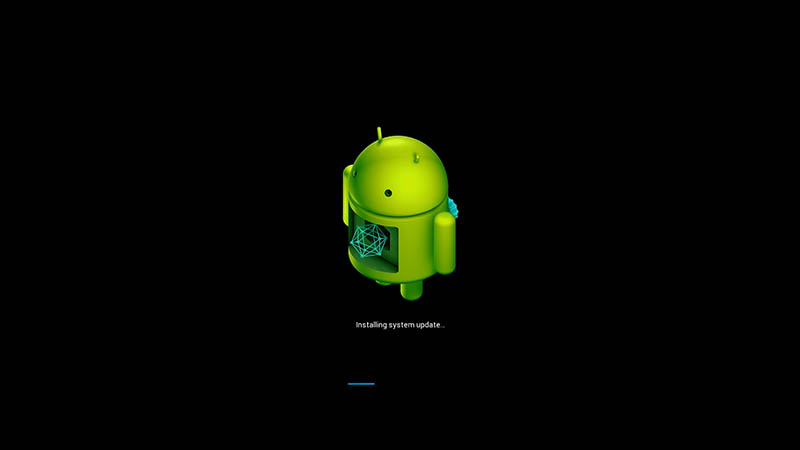
จากนั้นปุ่มค้างแล้ว ค่อยเปิดเครื่องครับ จะเข้าสู่หน้าอัพเดด ดังภาพด้านล่าง แล้วปล่อยเข็มที่จิ้มออกจาก reset
รอจนกว่าการอัพเดดจะเสร็จครับ
by myadmin Jul 29, 2020 | Review สินค้า , ข่าวสาร Update ใหม่ , ข่าวสาร ZIDOO
[vc_row][vc_column][vc_row_inner][vc_column_inner][/vc_column_inner][/vc_row_inner][vc_row_inner][vc_column_inner width=”1/2″][vc_btn title=”ซื้อที่ LAZADA” color=”blue” align=”center” i_icon_fontawesome=”fas fa-share-square” button_block=”true” add_icon=”true” link=”url:https%3A%2F%2Fshopee.co.th%2Fpeakhdplayer|||”][vc_single_image image=”5983″ alignment=”center” style=”vc_box_shadow_3d” onclick=”custom_link” link=”https://shopee.co.th/peakhdplayer”][/vc_column_inner][vc_column_inner width=”1/2″][vc_btn title=”ซื้อที่ SHOPEE” color=”blue” align=”center” i_icon_fontawesome=”fas fa-cart-arrow-down” button_block=”true” add_icon=”true” link=”url:https%3A%2F%2Fshopee.co.th%2Fpeakhdplayer|||”][vc_single_image image=”5983″ alignment=”center” style=”vc_box_shadow_3d” onclick=”custom_link” link=”https://shopee.co.th/peakhdplayer”][/vc_column_inner][/vc_row_inner][vc_column_text][smartslider3 slider=”7″][/vc_column_text][vc_message message_box_style=”solid-icon” message_box_color=”black” icon_fontawesome=”” css_animation=”fadeIn”]
ZIDOO Z10 Pro ใหม่ มาพร้อม Chipset Realtek 1619
ให้ RAM 2GB(DDR4) และ ROM 16GB
พัฒนาขึ้นมาในปัจจุบันนี้ เป็น Generation ที่ 3 แล้ว
รวมถึงยังพัฒนาขึ้นมาอย่างต่อเนื่อง ตั้งแต่ Realtek 1295-1619
[/vc_message][vc_single_image image=”5817″ img_size=”full” add_caption=”yes” alignment=”center” style=”vc_box_shadow” css_animation=”fadeInUp” lazy_loading=”true”][vc_message message_box_color=”black” icon_fontawesome=”” css_animation=”fadeIn”]
ZIDOO Z10 Pro ใหม่ มาพร้อม REALTEK1619 ใหม่ ที่รองรับ HDR10+ และ Dolby Vision อย่างสมบูรณ์แบบ
นี้คือการก้าวกระโดดของ Chipset ของ Realtek อีกขั้นนึง
[/vc_message][vc_single_image image=”5818″ img_size=”full” add_caption=”yes” css_animation=”fadeInUp” lazy_loading=”true”][vc_single_image image=”5821″ img_size=”full” add_caption=”yes” css_animation=”fadeInUp” lazy_loading=”true”][vc_message message_box_color=”black” icon_fontawesome=””]
ZIDOO Z10 ใหม่ ขึ้นรูปมาด้วยโลหะที่มีคุณภาพและการระบายความร้อนผ่านบอดี้ของเครื่อง
ซึ่งมีพัดลมเพื่อระบายอากาศที่ด้านหลังของเครื่อง ยืดอายุการใช้งานมากขึ้น
[/vc_message][vc_single_image image=”5841″ img_size=”full” add_caption=”yes” css_animation=”bounceIn” lazy_loading=”true”][vc_single_image image=”5820″ img_size=”full” add_caption=”yes” css_animation=”bounceIn” lazy_loading=”true”][vc_message message_box_color=”black” icon_fontawesome=””]
ZIDOO Z10 ใหม่ มาพร้อม RAM 2GB DDR4 และ Storage 32GB
ซึ่งเพียงพอต่อการใช้งานโดยรวมได้เป็นอย่างดี
[/vc_message][vc_single_image image=”5840″ img_size=”full” add_caption=”yes” css_animation=”bounceIn” lazy_loading=”true”][vc_single_image image=”5819″ img_size=”full” add_caption=”yes” css_animation=”fadeInUp” lazy_loading=”true”][vc_single_image image=”5822″ img_size=”full” add_caption=”yes” css_animation=”fadeInUp” lazy_loading=”true”][vc_single_image image=”5828″ img_size=”full” add_caption=”yes” css_animation=”fadeInUp” lazy_loading=”true”][vc_single_image image=”5829″ img_size=”full” add_caption=”yes” css_animation=”bounceIn” lazy_loading=”true”][vc_single_image image=”5824″ img_size=”full” add_caption=”yes” css_animation=”fadeInUp” lazy_loading=”true”][vc_single_image image=”5507″ img_size=”full” add_caption=”yes” css_animation=”bounceIn” lazy_loading=”true”][vc_single_image image=”5825″ img_size=”full” add_caption=”yes” css_animation=”bounceIn” lazy_loading=”true”][vc_single_image image=”5826″ img_size=”full” add_caption=”yes” css_animation=”fadeInUp” lazy_loading=”true”][vc_single_image image=”5827″ img_size=”full” add_caption=”yes” css_animation=”fadeInUp” lazy_loading=”true”][vc_single_image image=”5816″ img_size=”full” add_caption=”yes” css_animation=”fadeInUp” lazy_loading=”true”][vc_single_image image=”5843″ img_size=”full” add_caption=”yes” css_animation=”bounceIn” lazy_loading=”true”][vc_message message_box_style=”solid-icon” message_box_color=”black” icon_fontawesome=”fa fa-sort-amount-desc” css_animation=”fadeIn”]
HDR10+ ดีกว่า HDR10 และ HDR ตรงที่การปรับโทนสี เฉดสีใน HDR10+ จะปรับในแต่ละเฟรมทั้งเรื่อง
ในขณะนี้ HDR10 / HDR ทำได้เพียงโทนเดียวทั้งในเฟรมเรื่องนั้น
และค่า Nits คือ ความเข้มของการส่องสว่างต่อพื้นที่หนึ่งตารางเมตร
[/vc_message][vc_single_image image=”5830″ img_size=”full” add_caption=”yes” css_animation=”fadeInUp” lazy_loading=”true”][vc_single_image image=”5831″ img_size=”full” add_caption=”yes” css_animation=”bounceIn” lazy_loading=”true”][vc_single_image image=”5832″ img_size=”full” add_caption=”yes” css_animation=”bounceIn” lazy_loading=”true”][vc_single_image image=”5516″ img_size=”full” add_caption=”yes” css_animation=”fadeInUp” lazy_loading=”true”][vc_single_image image=”5833″ img_size=”full” add_caption=”yes” css_animation=”fadeInUp” lazy_loading=”true”][vc_single_image image=”5515″ img_size=”full” add_caption=”yes” css_animation=”fadeInUp” lazy_loading=”true”][vc_single_image image=”5838″ img_size=”full” add_caption=”yes” css_animation=”fadeInUp” lazy_loading=”true”][vc_message message_box_style=”solid-icon” message_box_color=”black” icon_fontawesome=”” css_animation=”fadeIn”]
Zidoo Z10 PRO หากที่บ้านของคุณมี Nas server หรือคอมพิวเตอร์ PC
ที่มีไฟล์หนังบรรจุอยู่ ท่านสามารถที่จะเล่นผ่านระบบ Lan network ในบ้าน
โดยเครื่อง Zidoo Z10 PRO สามารถที่จะดึงข้อมูลออกมาและแสดงผลได้อย่างดีเยี่ยม
[/vc_message][vc_single_image image=”5519″ img_size=”full” add_caption=”yes” css_animation=”fadeInUp” lazy_loading=”true”][vc_single_image image=”5520″ img_size=”full” add_caption=”yes” css_animation=”fadeInUp” lazy_loading=”true”][vc_single_image image=”5521″ img_size=”full” add_caption=”yes” css_animation=”fadeInUp” lazy_loading=”true”][vc_single_image image=”5882″ img_size=”full”][vc_single_image image=”6204″ img_size=”full”][/vc_column][/vc_row]
by myadmin Jul 23, 2020 | Tip วิธีใช้งาน , TIP-Dune , Uncategorized
[vc_row][vc_column][vc_message message_box_color=”black”]สำหรับท่านใดที่กำลังหา Subtitle สามารถหา Subtitle ภายนอกได้ที่เว็บนี้ หรือเว็บไซย์อื่นๆครับ เป็นต้น[/vc_message][vc_single_image image=”5622″ img_size=”full”][vc_message message_box_color=”black”]ทางร้านทดสอบ โหลดไฟล์แบบ SRT และ SSA เมื่อท่านโหลดมาแล้ว ต้องทำการ Rename ชื่อหนังจากในคอมพิวเตอร์ของตนเอง ให้ชื่อตรงกับไฟล์หนังของท่าน เช่น
ที่ร้านโหลดไฟล์ซัพมาชื่อ Gods.Of.Egypt.2016.1080p.Bluray.x264-[YTG.AG]-Copy.srt ต้องทำการเปลี่ยนเป็นชื่อ Gods of Egypt (930).srt
จะสังเกตุว่าชื่อจะตรงกับไฟล์ mkv ที่ชื่อว่า Gods of Egypt (930).mkv [/vc_message][vc_single_image image=”5623″ img_size=”full”][vc_message message_box_color=”black”]เปลี่ยนชื่อSubtitle ให้ตรงกับไฟล์หนังและใส่ไว้ในโฟลเดอร์หนังเดียวกัน
เพื่อให้เครื่อง Dune เจอ ซับตัวนี้ในการใช้งานเวลาเปิดไฟล์หนังครับ เพียงเท่านี้ก็ใช้งานได้แล้ว
โดย ต้องวางไว้ในโฟลเดอร์หนังของท่าน โดยสร้างโฟลเดอร์หนังและด้านในมีไฟล์
-Gods of Egypt (930).mkv
-Gods of Egypt (930).srt
เป็นต้น[/vc_message][vc_single_image image=”5624″ img_size=”full” css_animation=”fadeInUp”][vc_separator color=”black” border_width=”3″][vc_message message_box_color=”black”]เริ่มทดสอบว่าใช้งานได้หรือไม่ ให้เริ่มเล่นไฟล์หนังจาก Source[/vc_message][vc_single_image image=”5628″ img_size=”full” css_animation=”fadeInUp”][vc_message message_box_color=”black”]เข้า Harddisk ของเราเพื่อทดสอบ[/vc_message][vc_single_image image=”5633″ img_size=”full” css_animation=”fadeInUp”][vc_message message_box_color=”black”]กดเข้าเล่น ไฟล์ mkv ในภาพตัวอย่างคือ Gods of Egypt (930).mkv[/vc_message][vc_single_image image=”5626″ img_size=”full” css_animation=”fadeInUp”][vc_message message_box_color=”black”]กดปุ่ม POP UP MENU[/vc_message][vc_single_image image=”5627″ img_size=”full” css_animation=”fadeInUp”][vc_single_image image=”5632″ img_size=”full” css_animation=”fadeInUp”][vc_message message_box_color=”black”]เลือก Subtitle[/vc_message][vc_single_image image=”5630″ img_size=”full” css_animation=”fadeInUp”][vc_message message_box_color=”black”]พบคำว่า “External ” หมายถึง Subtitle ที่เราวางไว้ ได้เข้ามาแล้ว[/vc_message][vc_single_image image=”5631″ img_size=”full” css_animation=”fadeInUp”][vc_message message_box_color=”black”]Subtitle ที่เราวางไว้ ได้แสดงออกมาแล้วครับ เรียบร้อยครับ[/vc_message][vc_single_image image=”5629″ img_size=”full” css_animation=”fadeInUp”][/vc_column][/vc_row]
by myadmin Jul 22, 2020 | Tip วิธีใช้งาน , TIP-PROJECTOR OWLENZ
[vc_row][vc_column][vc_message message_box_color=”black”]1.คลิป Video สำหรับการแก้ไขขั้นตอนแรก [/vc_message][vc_video link=”https://youtu.be/IKMSedDGYmg”][vc_message message_box_color=”black”]2.คลิป Video สำหรับการลงแอพ Youtube ตัวอื่นเพื่อใช้งานเพิ่มเติม (รุ่นนี้รองรับคีบอร์ดภาษาไทย Serach ไทยได้) [/vc_message][vc_video link=”https://youtu.be/YlQ4PfzAsT0″][/vc_column][/vc_row][vc_row][vc_column][vc_single_image image=”5808″ img_size=”medium”][vc_btn title=”แอพลง Youtube แบบใหม่” style=”3d” color=”danger” size=”lg” align=”center” button_block=”true” link=”url:https%3A%2F%2Fdrive.google.com%2Fuc%3Fexport%3Ddownload%26id%3D1-UqPVdx3w1MjkF48b8HClfGRTFogNiz0|||”][vc_separator color=”black”][vc_btn title=”แอพลงคีบอร์ดไทยใหม่ Keyboard ไทย” style=”3d” color=”danger” size=”lg” align=”center” button_block=”true” link=”url:https%3A%2F%2Fdrive.google.com%2Fuc%3Fexport%3Ddownload%26id%3D0B_6HTHvba5J4UzdoeUFtNWVMMDQ|||”][vc_message message_box_color=”grey”]สำหรับในโปรเจคเตอร์ในการลง App Keyboard ไทย หลังจาก install ลงแล้ว ให้ไปที่
1.ไปที่เมนู Setting ของโปรเจคเตอร์
2.ไปที่เมนู Keyboard ของโปรเจคเตอร์
3. เลือก GadgetdoorThai หรือ Thaihardware keyboard ครับ แล้ว คีบอร์ดเราจะมีหรือเป็นภาษาไทยแล้วครับ
4.ลองกดออกแล้วไปเข้าเว็บไซย์เพื่อเทสดูว่า คีบอร์ดเปลี่ยนหรือยัง[/vc_message][/vc_column][/vc_row]
by myadmin Jul 22, 2020 | Review สินค้า , ข่าวสาร Update ใหม่ , ข่าวสาร ZIDOO
[vc_row][vc_column][vc_row_inner][vc_column_inner][vc_column_text][smartslider3 slider=4][/vc_column_text][/vc_column_inner][/vc_row_inner][vc_row_inner][vc_column_inner width=”1/2″][vc_btn title=”LAZADA” style=”3d” color=”black” align=”center” i_icon_fontawesome=”fas fa-chevron-circle-right” button_block=”true” add_icon=”true” link=”url:https%3A%2F%2Fshopee.co.th%2Fproduct%2F13582684%2F1776069027%2F|||”][vc_single_image image=”5974″ alignment=”center” style=”vc_box_shadow_3d”][/vc_column_inner][vc_column_inner width=”1/2″][vc_btn title=”กดสั่งซื้อที่ SHOPEE” style=”3d” color=”black” align=”center” i_icon_fontawesome=”fas fa-chevron-circle-right” button_block=”true” add_icon=”true” link=”url:https%3A%2F%2Fshopee.co.th%2Fproduct%2F13582684%2F1776069027%2F|||”][vc_single_image image=”5974″ alignment=”center” style=”vc_box_shadow_3d” onclick=”custom_link” link=”https://shopee.co.th/product/13582684/1776069027/”][/vc_column_inner][/vc_row_inner][vc_row_inner][vc_column_inner width=”1/2″][vc_single_image image=”5493″ img_size=”full” add_caption=”yes” css_animation=”bounceInUp” lazy_loading=”true”][/vc_column_inner][vc_column_inner width=”1/2″][vc_message message_box_style=”solid-icon” message_box_color=”black” icon_fontawesome=”fa fa-sort-amount-desc” css_animation=”fadeIn”]
ZIDOO Z9x ใหม่ พัฒนาขึ้นมาในปัจจุบันนี้ เป็น Generation ที่ 3 แล้ว
รวมถึงยังพัฒนาขึ้นมาอย่างต่อเนื่อง ตั้งแต่ Realtek 1295-1619
[/vc_message][/vc_column_inner][/vc_row_inner][vc_single_image image=”5877″ img_size=”full” alignment=”center”][vc_single_image image=”5490″ img_size=”full” add_caption=”yes” alignment=”center” style=”vc_box_shadow” css_animation=”fadeInUp” lazy_loading=”true”][vc_message message_box_color=”black” icon_fontawesome=”fa fa-quote-left” css_animation=”fadeIn”]
ZIDOO Z9x ใหม่ มาพร้อม REALTEK1619 ใหม่ ที่รองรับ HDR10+ และ Dolby Vision อย่างสมบูรณ์แบบ
นี้คือการก้าวกระโดดของ Chipset ของ Realtek อีกขั้นนึง
[/vc_message][vc_single_image image=”5491″ img_size=”full” add_caption=”yes” alignment=”center” css_animation=”fadeInUp” lazy_loading=”true”][vc_message message_box_color=”black” icon_fontawesome=”fa fa-quote-left”]
ZIDOO Z9x ใหม่ ขึ้นรูปมาด้วยโลหะที่มีคุณภาพและการระบายความร้อนผ่านบอดี้ของเครื่อง
ซึ่งมีช่องระบายอากาศที่ด้านข้างและด้านใต้เครื่อง
[/vc_message][vc_row_inner][vc_column_inner width=”1/2″][vc_single_image image=”5502″ img_size=”full” add_caption=”yes” css_animation=”bounceIn” lazy_loading=”true”][/vc_column_inner][vc_column_inner width=”1/2″][vc_message message_box_color=”black” icon_fontawesome=”fa fa-quote-left”]
ZIDOO Z9x ใหม่ มาพร้อม RAM 2GB DDR4 และ Storage 16GB
ซึ่งเพียงพอต่อการใช้งานโดยรวมได้เป็นอย่างดี
[/vc_message][/vc_column_inner][/vc_row_inner][vc_single_image image=”5524″ img_size=”full” add_caption=”yes” css_animation=”bounceIn” lazy_loading=”true”][vc_single_image image=”5504″ img_size=”full” add_caption=”yes” css_animation=”fadeInUp” lazy_loading=”true”][vc_single_image image=”5510″ img_size=”full” add_caption=”yes” css_animation=”bounceIn” lazy_loading=”true”][vc_single_image image=”5528″ img_size=”full” add_caption=”yes” css_animation=”bounceIn” lazy_loading=”true”][vc_single_image image=”5505″ img_size=”full” add_caption=”yes” css_animation=”fadeInUp” lazy_loading=”true”][vc_single_image image=”5507″ img_size=”full” add_caption=”yes” css_animation=”bounceIn” lazy_loading=”true”][vc_single_image image=”5506″ img_size=”full” add_caption=”yes” css_animation=”bounceIn” lazy_loading=”true”][vc_row_inner][vc_column_inner width=”1/2″][vc_single_image image=”5508″ img_size=”full” add_caption=”yes” css_animation=”fadeInUp” lazy_loading=”true”][/vc_column_inner][vc_column_inner width=”1/2″][vc_single_image image=”5509″ img_size=”full” add_caption=”yes” css_animation=”bounceIn” lazy_loading=”true”][/vc_column_inner][/vc_row_inner][vc_row_inner][vc_column_inner width=”1/2″][vc_single_image image=”5812″ img_size=”full” add_caption=”yes” css_animation=”fadeInUp” lazy_loading=”true”][/vc_column_inner][vc_column_inner width=”1/2″][vc_single_image image=”5498″ img_size=”full” add_caption=”yes” css_animation=”fadeInUp” lazy_loading=”true”][/vc_column_inner][/vc_row_inner][vc_message message_box_style=”solid-icon” message_box_color=”black” icon_fontawesome=”fa fa-sort-amount-desc” css_animation=”fadeIn”]
HDR10+ ดีกว่า HDR10 และ HDR ตรงที่การปรับโทนสี เฉดสีใน HDR10+ จะปรับในแต่ละเฟรมทั้งเรื่อง
ในขณะนี้ HDR10 / HDR ทำได้เพียงโทนเดียวทั้งในเฟรมเรื่องนั้น
และค่า Nits คือ ความเข้มของการส่องสว่างต่อพื้นที่หนึ่งตารางเมตร
[/vc_message][vc_single_image image=”5512″ img_size=”full” add_caption=”yes” css_animation=”bounceIn” lazy_loading=”true”][vc_single_image image=”5513″ img_size=”full” add_caption=”yes” css_animation=”bounceIn” lazy_loading=”true”][vc_single_image image=”5514″ img_size=”full” add_caption=”yes” css_animation=”bounceIn” lazy_loading=”true”][vc_single_image image=”5516″ img_size=”full” add_caption=”yes” css_animation=”fadeInUp” lazy_loading=”true”][vc_single_image image=”5517″ img_size=”full” add_caption=”yes” css_animation=”fadeInUp” lazy_loading=”true”][vc_single_image image=”5515″ img_size=”full” add_caption=”yes” css_animation=”fadeInUp” lazy_loading=”true”][vc_single_image image=”5518″ img_size=”full” add_caption=”yes” css_animation=”fadeInUp” lazy_loading=”true”][vc_message message_box_style=”solid-icon” message_box_color=”black” icon_fontawesome=”” css_animation=”fadeIn”]
Specification
Model
Z9X
Shell Material
Aluminum alloy
Front Display
LED
OS
Android 9.0
CPU
Realtek RTD1619DR ARM Cortex-A55 Hexa-core
GPU
ARM Mali-G51 MP3
RAM
2GB DDR4
Internal Storage
16GB eMMC
Bluetooth
BT 4.2
Wifi Connectivity
2.4G+5G dual-band WiFi, 802.11 a/b/g/n/AC 2R2T MIMO 867Mbps
Ethernet
RJ-45 Ethernet jack(10/100/1000Mbps) * 1
HDMI Output
HDMI 2.0a, support up to 4K@60p, HDR, 12Bit, YCbCr 4:4:4 color range, support audio passthrough
HDMI Input
HDMI 2.0, support 4K@60p, 48khz PCM audio
Video Decode
4K@60p HEVC/H.265 12 Bit HDR10, HDR10+, Dolby vision
Audio Decode
Support HD audio passthrough and decode 2 channels
Intelligent Control
APP control, HTTP control
Power Supply
DC 12V 2A
SATA
SATA 3.0 * 1
USB
USB 3.0 * 2
Other Interfaces
3.5mm AV output * 1
[/vc_message][vc_message message_box_style=”solid-icon” message_box_color=”black” icon_fontawesome=”fa fa-sort-amount-desc” css_animation=”fadeIn”]
Zidoo Z9x หากที่บ้านของคุณมี Nas server หรือคอมพิวเตอร์ PC
ที่มีไฟล์หนังบรรจุอยู่ ท่านสามารถที่จะเล่นผ่านระบบ Lan network ในบ้าน
โดยเครื่อง Zidoo Z9x สามารถที่จะดึงข้อมูลออกมาและแสดงผลได้อย่างดีเยี่ยม
[/vc_message][vc_single_image image=”5519″ img_size=”full” add_caption=”yes” css_animation=”fadeInUp” lazy_loading=”true”][vc_single_image image=”5520″ img_size=”full” add_caption=”yes” css_animation=”fadeInUp” lazy_loading=”true”][vc_single_image image=”5521″ img_size=”full” add_caption=”yes” css_animation=”fadeInUp” lazy_loading=”true”][vc_single_image image=”5882″ img_size=”full” add_caption=”yes” css_animation=”fadeInUp” lazy_loading=”true”][vc_single_image image=”6204″ img_size=”full” add_caption=”yes” css_animation=”fadeInUp” lazy_loading=”true”][vc_single_image image=”6227″ img_size=”full”][vc_single_image image=”6226″ img_size=”full”][vc_single_image image=”6228″ img_size=”full”][/vc_column][/vc_row]

![[TIP-TRICK] EWEAT R9MINI การอัพเฟิมแวร์ ล่าสุด](https://beelinkthailand.com/wp-content/uploads/2020/08/VID_20180110_10.16.16.jpg)
 [/vc_column_text][vc_video link=”https://youtu.be/BpNMofLq8m8″][vc_single_image image=”5890″ img_size=”full” alignment=”center” style=”vc_box_border”][/vc_column][/vc_row]
![[Tip-Trick] Dune HD PRO 4K II การเพิ่ม ซับไตเติ้ลจากภายนอก External Subtitle สำหรับ HD PLAYER](https://beelinkthailand.com/wp-content/uploads/2020/07/IMG_20200723_205751-scaled.jpg)
![[TIP-TRICK] การแก้ไขใช้งาน Youtube ในโปรเจคเตอร์ Owlenz & CLOUD](https://beelinkthailand.com/wp-content/uploads/2020/07/YouTube-Vanced-APK-download-v15.jpg)
