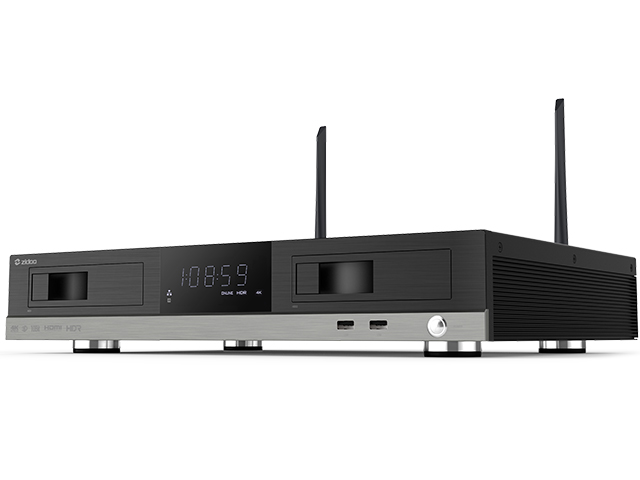
เปรียบเทียบให้ชัด ZIDOO UHD PLAYER 4K ความแตกต่างของ Zidoo X9s  , X10 , Z9s , Z10 , Z1000 ,  X20 ,  X20 Pro , UHD2000 ทุกรุ่น ปี 2018-2020

เปรียบเทียบให้ชัด ZIDOO UHD PLAYER 4K ความแตกต่างของ Zidoo X9s  , X10 , Z9s , Z10 , Z1000 ,  X20 ,  X20 Pro , UHD2000 ทุกรุ่น ปี 2018-2020

[vc_row][vc_column][vc_message message_box_style=”3d” message_box_color=”black” icon_fontawesome=”fa fa-hand-peace-o”]

เปรียบเทียบให้ชัด UHD PLAYER 4K ZIDOO

ความแตกต่างของ Zidoo X9s  , X10 , Z9s , Z10 ,  X20 ,  X20 Pro ทุกรุ่น ปี 2018-2019

[/vc_message][vc_message message_box_color=”sky” icon_fontawesome=”fa fa-share-square”]

อ่านรีวิวนี้ได้ส่วนลดทันที 200 บาท นำ Code นี้ไปสั่งซื้อที่ Lazada ร้าน PEAK เท่านั้น

Code ส่วนลด 200 บาท คือ ZIDOPEAK2020  กดสั่งซื้อที่ www.lazada.co.th/peakhdplayer

[/vc_message][vc_separator style=”shadow”][/vc_column][/vc_row][vc_row][vc_column][vc_single_image image=”3499″ img_size=”full” alignment=”center”][vc_separator style=”shadow”][vc_column_text]

1. อธิบายและข้อแตกต่างเบื้องต้น

X9s X10 Z9s Z10 X20 X20 Pro 

โดยตามหลักแล้ว ตัว Zidoo X9 X10 จะอยู่ใน Gen ของปีที่เก่ากว่า แต่ก็ใช่ว่า จะไม่รองรับอนาคต เพราะว่า Realtek 1295DD ยังรองรับได้ดี กับไฟล์หนังต่างๆในปัจจุบันเป็นอย่างมาก และรองรับระบบเสียงที่ครบสมบูรณ์ ทั้ง Dolby Atmos และ Dts : X และคนยังใช้และนิยมอยู่ เนื่องจากในอนาคต จะกลายเป็นตัวที่ ลดราคาถูกลงมาครับ เนื่องด้วย Z9s Z10 มาแทน 2 ตัวนี้นั้นเอง
 แล้วความแตกต่างคือ อะไร
  •           X9s X10 เป็น Realtek 1295DD ซึ่งจะเก่ากว่า ในด้านชิพเซ็ตครับ (ของปีเก่ากว่า )
  •           ส่วน Z9s Z10 X20 X20 Pro  คือ สินค้าในกลุ่ม Realtek 1296 เป็นชิพแบบเดียวกันทั้งหมด (ถือว่าเป็น Product ใหม่ของปี 2018 )

เชิญทุกท่านรับชม ตารางเปรียบเทียบจากทาง PEAKHD ได้เลย เพราะ นี้คือ 4K UHD PLAYER ที่ดีที่สุดจาก Zidoo ครับ

****แก้ไขข้อมูลจากตารางครับ ทาง zidoo x9s x10 มีช่องต่อ AV แบบ 1 ออก 3 ครับ หรือต้องหาซื้อสายเฉพาะมาเสียบที่เครื่องในช่อง AV ครับ[/vc_column_text][vc_separator style=”shadow”][vc_column_text]

2. Z9s , Z10 , X20 , X20 Pro แม้ว่าจะเป็น ชิพเซ็ต Realtek 1296

ตัวเดียวกัน แต่มีอะไรที่ต่างออกไป ?

ถึงแม้ว่า Z9s Z10 จะใช้ Realtek 1296 เช่นเดียวกับรุ่นพี่ แต่ความแตกต่างคือ

X20 / X20 Pro มีการทำแผงวงจรที่ดีกว่า และรองรับ Port เชื่อมต่อภายนอกมากกว่า และวัสดุภายนอกที่ Premium เป็นอย่างมาก

ส่วนคุณภาพด้านเสียงและภาพ ดีขึ้นได้อีกหน่อยจาก ตัวภาคจ่ายไฟ ของ Zidoo ที่อยู่ในตัวรุ่นใหญ่

(Z9s , Z10 ใช้ ตัว Adapter นอกตัวเครื่อง)

  • X20 มี Port เชื่อมต่อหลากหลาย ครบมากกว่ารุ่นล่าง Z9s Z10
  • งานออกแบบตัวเครื่องและการระบายความร้อนที่ใช้เทคโนโลยีขั้นสูง รวมถึงภาคจ่ายไฟที่กล่าวมา
  • ความสวยงามภาพ 4K ที่เล่นจาก X20 ดีกว่ารุ่น Z9S และ Z10 เนื่องจากผลพลอยได้จากการส่งสัญญาณผ่าน HDMI ที่แยกเสียงกับภาพออกจากกัน
  • และยิ่งไปกว่านั้น คือท่านใดที่มี Home theather AVR ที่เป็นรุ่นเก่าและไม่ได้อัพเดด ก็ต่อสายแยกภาพไปทีวี เสียงไป AVR ได้เลย และคุณภาพไม่ลดลง
  • X20 Pro มี DAC Chipset ช่วยเรื่องเสียง ฟังเพลง ผ่าน XLR port ให้เสียงดีที่สุดในตลาด และเป็นชิพตัวเดียวกับ Oppo รุ่น Top ครับ

[/vc_column_text][vc_separator style=”shadow”][vc_single_image image=”3498″ img_size=”full” alignment=”center”][vc_separator style=”shadow”][vc_column_text]

3.จะซื้อ Zidoo Z9s , Z10 รุ่นไหนดี

Z9s Z10 มี Spec ภายในเหมือนกันทุกอย่างไม่ว่าจะเป็น

  • CPU ตัวเดียวกัน Ram และ Rom เท่ากันหมด

สิ่งที่แตกต่าง และ Z10 นั้น จะเป็นในเรื่องของ

  • Harddisk เชื่อมต่อภายในกล่อง ซึ่งทำให้ดูเป็นระเบียบมากขึ้น
  • พัดลมระบายอากาศหลังเครื่อง ช่วยให้อากาศถ่ายเทสะดวก และยืดอายุการใช้งานได้
  • จอแสดงผล LED หน้าเครื่องที่ใหญ่
  • Coaxial ที่เพิ่มเข้ามาให้
  • และตัวบอดี้ที่ทาง Admin คิดว่า สวยกว่า Z9s ครับ
  • นอกจากนี้ Z10 ถอดเสาไวไฟเก็บได้ แต่ Z9s ตามสเปคภาพในรุ่นนี้ถอดเสาไวไฟ ออกไม่ได้น่ะครับ
  • Port AV แบบ 3 Port ขาว เหลือง แดง ไม่ต้องใช้สายมาแปลงต่อเหมือนรุ่น z9s ครับ

[/vc_column_text][vc_separator style=”shadow”][vc_column_text]

4.ความต่างของ Zidoo Z9s , Z10 รุ่นใหม่  กับ Zidoo X9s , X10 รุ่นเก่า

Zidoo Z9s กับ Z10 คือตัวพัฒนาต่อจาก x9s , x10

  • PORT เชื่อมต่อ SATA มากขึ้นกว่ารุ่นเดิม จาก 1 เป็น 2 Port
  • USB มากขึ้นกว่าเดิม
  • คุณภาพ CPU ดีขึ้น ให้ภาพและเสียงที่ดีขึ้น
  • Android เป็น Version 7 ซึ่งตัวเก่าเป็น Android 6.0

การใช้งานโดยรวมต้องถือว่าต้องดีขึ้นแน่นอน แต่ราคาย่อมแพงกว่ารุ่นเก่าครับ

ท่านที่ประหยัดงบ x9s ยังรองรับปัจจุบันได้อีกหลายปีครับ

Z9s ท่านจะได้อนาคตของเครื่องเล่น 4K UHD Player ครับ และย่อมแน่นอนเฟิมแวร์ จะพัฒนาต่อไปอีก 2-3 ปี

[/vc_column_text][vc_separator style=”shadow”][vc_message message_box_color=”black”]

รูปภาพของ Zidoo Z9s Z10 ครับ

[/vc_message][vc_media_grid element_width=”3″ grid_id=”vc_gid:1579677572409-c9429fcc-e519-7″ include=”3501,3504,3505,3506″][vc_media_grid element_width=”3″ grid_id=”vc_gid:1579677572410-4a21b1ff-c337-2″ include=”3402,3403,3404,3405″][vc_separator style=”shadow”][vc_video link=”https://www.youtube.com/watch?v=yQiJTqMWr4Q” align=”center” title=”รีวิวรุ่น Zidoo Z9s และ Zidoo Z10″][/vc_column][/vc_row][vc_row][vc_column][vc_column_text]

5.Zidoo Z1000 มาใหม่แล้ว ต่างกับรุ่นไหน ยังไงบ้าง

Zidoo Z1000 ต้องบอกว่าเป็น Chipset 1296 เช่นเดียวกัน

ทาง Zidoo จัดวางให้อยู่ระหว่าง Z10 กับ X20 ใน เรื่องของราคาครับ

Z1000 นั้นสเปคเดียวกับ Z10 ครับ

โดยมี พอร์ต HDMI เท่ากัน / USB เท่ากัน และ Ram 2GB/Rom16GB เท่ากันครับ

Z1000 เป็นเสาสัญญาณ Buit-in ครับ

สำหรับ Z1000 นั้น ข้อที่ดีกว่า Z10 คือ

– ตัวเครื่องดีมากขึ้น วัสดุดีขึ้นครับ และเสาสัญญาณ Wifi เก็บไว้ภายใน

– ตัว Power Supply ของเครื่อง โมอยู่ภายในและดีกว่า ใช้ Adapter แบบ Z10 ครับ ช่วยให้ภาพเสียงดีขึ้นครับ

– จอ LED แสดงสถานะโชว์ด้านหน้าขนาดใหญ่ครับ

[/vc_column_text][vc_single_image image=”4297″ img_size=”medium” alignment=”center”][vc_column_text]

5.Zidoo UHD2000 มาใหม่แล้ว 

Zidoo UHD2000 ต้องบอกว่าเป็น Chipset 1296 เช่นเดียวกัน

ทาง Zidoo จัดวางให้อยู่ Top Hi end เรื่องของราคาครับ

เป็นรุ่นที่มีสเปค POwer supply ภายใน ที่ดีที่สุดในทุกๆรุ่น

ราคาเครื่องจึงแพงที่สุดคือ 30000 บาท ในตอนนี้

[/vc_column_text][vc_single_image image=”4428″ img_size=”medium” alignment=”center”][vc_message]

สนใจสินค้าและสั่งซื้อที่ Line @peakhd ได้ครับ

สำหรับรุ่น Z9s และ Z10 จะมีวางแล้วครับ

และ

Z1000/ x20 / X20 Pro / UHD2000 ก็มีแล้วเช่นกัน

แล้วอย่าลืม ขอเอกสารหรือสอบถามร้านที่จำหน่ายว่า มีใบอนุญาต กสทช หรือไม่น่ะครับ

เพราะว่าร้านไหนที่ไม่มีย่อมหมายถึงเป็นเครื่องหิ้วที่ไม่มีศูนย์ซ่อมนั้นเอง

อุดหนุนสินค้าทางบริษัทผู้นำเข้า Zidoo อย่างถูกต้องตามกฏหมาย

โปรดสั่งซื้อที่ PEAK HD ขอบพระคุณครับ

[/vc_message][vc_single_image image=”4564″ img_size=”medium” alignment=”center” style=”vc_box_shadow_3d”][vc_btn title=”สั่งซื้อตอนนี้ที่ลาซาด้า” style=”3d” color=”danger” size=”lg” align=”center” i_icon_fontawesome=”fa fa-share-square-o” button_block=”true” add_icon=”true” link=”url:https%3A%2F%2Fwww.lazada.co.th%2Fpeakhdplayer|||”][vc_message]อ่านรีวิวนี้ได้ส่วนลดทันที 200 บาท นำ Code นี้ไปสั่งซื้อที่ Lazada ร้าน PEAK เท่านั้น

Code ส่วนลด 200 บาท คือ ZIDOPEAK2020[/vc_message][/vc_column][/vc_row][vc_row][vc_column][vc_separator style=”shadow”][/vc_column][/vc_row]

EGREAT A5/A10 Firmware เฟิมแวร์ EGREAT ล่าสุด

EGREAT A5/A10 Firmware เฟิมแวร์ EGREAT ล่าสุด

[vc_row][vc_column][vc_column_text]อัพเดดของ EGREAT A5/A10 ล่าสุด

Note: Egreat A5 EN firmware includes “Release” version and “Beta” version,
“Release” version firmware that you can download it click here
“Beta” version firmware is only for some enthusiasts who like to test some new problems and solved problems in advanced.

FIRMWARE ของเครื่อง A5 เท่านั้น

A5BD_EN_Firmware_20180426_v1.2.9.0.rar

I. info
A5BD_EN_Firmware_20180426_v1.2.9.0.rar
MD5: 8AA71B725E89FC2B4C5F55016C04F87D
DownloadLink:
http://data.egreatworld.com/A5BD_EN_Firmware_20180426_v1.2.9.0.rar

[/vc_column_text][vc_column_text]


FIRMWARE ของเครื่อง A10 เท่านั้น

A10BD_EN_Firmware_20180426_v1.2.9.0.rar

I. info
A10BD_EN_Firmware_20180426_v1.2.9.0.rar
MD5: 7A7A9779A1C0E154EE936DD501752502
DownloadLink:
http://data.egreatworld.com/A10BD_EN_Firmware_20180426_v1.2.9.0.rar[/vc_column_text][/vc_column][/vc_row][vc_row][vc_column][vc_column_text]

Egreat A5/A10 USB update instruction การอัพเดดเครื่องจากเมนูในตัวเครื่อง

1. Please download the forced recovery firmware from the company’s official website (www.egreatworld.com), the forced recovery firmware contains the following 4 files: update.zip, fastboot.bin, recovery.img, bootargs.bin
Please do not modify the file name, and copy these four files to the root directory of the U-disk of FAT32 disk format.
wwwwwww.png

2. Then insert the U-disk into any USB interface of this machine.

3.Then enter the “Setting” from the home page interface and enter “About”, select “USB update” option, select the letter of current drive(usually D) for U-disk or mobile hard disk in the drop-down option, after press the OK key to confirm, the system will automatically find the update firmware xxx.zip from, after completed the detection, the system will automatically complete the upgrade process. The TV screen will appear green android small robot animation icon during the process of upgrading, please be patient.

4. After the USB update is completed, this machine will automatically restart, after restart, the player can be normally put into use.

[/vc_column_text][/vc_column][/vc_row][vc_row][vc_column][vc_column_text]The steps for system forced refresh/recovery system are as follows.

การอัพเดดเครื่องจากการกดปุ่มนอกเครื่อง การอัพเดดแบบนี้จะทำให้แอปที่ลงเพิ่มเติมหายไป แต่ช่วยในการเคลียค่าทั้งหมดเป็นโรงงานและใช้เมื่อเครื่องมีปัญหาในการเปิดได้

1. Please download the forced recovery firmware from the company’s official website (www.egreatworld.com), the forced recovery firmware contains the following 4 files: update.zip, fastboot.bin, recovery.img, bootargs.bin
Please do not modify the file name, and copy these four files to the root directory of the U-disk of FAT32 disk format, and must be less than 32GB.
[​IMG]
2. Cut off the power supply of this machine, inset the U-disk into the USB3.0 interface of this machine, with a slender hard object (something like the clip after expansion) to insert into the RST small round hole, keep holding down the RST key in RST round hole not loosened, turn on the machine power after holding down the RST button.

[​IMG]
3. Keep the posture, release the RST button until the TV screen appears the prompt (the green android small robot animation icon) of being forced refresh/recovery system, the system will automatically complete the forced refresh/recovery system process.

4. Please be patient, after the forced refresh/recovery system is completed, this machine will automatically restart, after restart, the player can be normally put into use.

Note

[/vc_column_text][/vc_column][/vc_row]

ZIDOO Z9s และ Zidoo Z10

ZIDOO Z9s และ Zidoo Z10

[vc_row][vc_column][vc_column_text]

ข่าวล่าสุด สำหรับ Product ที่จะขึ้นแท่นในปี 2019 สำหรับ Zidoo Z9s และ Zidoo Z10

       หนีไม่พ้นกับผู้พัฒนาที่ยอดเยี่ยมตลอดกาล อย่าง Zidoo Media Player

ผู้พัฒนาเครื่องเล่น Media Player ที่ยอดนิยมในตลาดขณะนี้

ได้กำลังออกผลิตภัณฑ์ตัวใหม่ โดยใช้ Chipset Reatek 1296 ออกมาแล้ว


สำหรับบางท่านที่ไม่ได้ติดตามมานาน จะพบว่าในปัจจุบัน Chipset Sigma ไม่ได้พัฒนาต่อ แต่ด้วยสาเหตุใดนั้น ไม่อาจทราบได้

ทำให้ขณะนี้ Chipset Realtek ได้เข้ามาตีตลาด ทางด้าน HD PLAYER ในหลายบริษัท


Zidoo Z9s เลือกใช้ Realtek 1296 ตัวปีใหม่ ที่เพิ่มเข้ามา รวมถึง Zidoo Z10 ด้วย สำหรับ สเป็คในขณะนี้ เป็นดังนี้ครับ

[/vc_column_text][/vc_column][/vc_row][vc_row][vc_column][vc_single_image image=”3409″ img_size=”large”][vc_message message_box_color=”black”]

ZIDOO Z9s

Shell Aviation Aluminum alloy case in silver
OS Android 7.1 + OpenWRT(NAS) dual system run simultaneously
CPU Realtek RTD1296DD ARM Cortex-A53 Quad-Core
GPU Mali T820 MP3
Memory 2GB DDR
Internal Storage 16GB eMMC
Wifi Connectivity 802.11 a/b/g/n/ac 2×2 MIMO 867Mbps
GIGABIT LAN 1*RJ-45 Ethernet Jack (10/100/1000Mbps)
Bluetooth BT4.1
HDMI Port
HDMI2.0a Output HDMI 2.0a, Support 4K@60fps, HDR10
HDMI2.0 Input HDMI 2.0
Video decode HDR, 10-bit HEVC/H.265 up to 4K@60fps,
VP9 up to 4K@60fps, H.264 up to 4K@24fps
Audio decode Support HD audio multichannel pass through and stereo decoding
USB Port 2* USB3.0
2 * USB2.0
Power DC 12V/3A
Other interface
1 * 3.5mm RS232
1 * IR receiver
1 * 3.5mm Cvbs Audio R/L
1 * OPTICAL (2CH, 5.1CH)
1 * Key
Recovery
2 * SATA3.0 To connect Serial ATA
1 * VFD display with LED light
1 * LED (Shutdown of red)
What’s in the box:
1*Media Player
1*Remote Control
1*HDMI Cable
1*Power Adapter
1*User Manual
[/vc_message][vc_separator][/vc_column][/vc_row][vc_row][vc_column][vc_single_image image=”3410″ img_size=”large”][vc_message message_box_color=”black”]

ZIDOO Z10

Model Z10
Shell Aviation Aluminum alloy case in silver+black
OS Android 7.1 + OpenWRT(NAS) dual system run simultaneously
CPU Realtek RTD1296 ARM Cortex-A53 Quad-Core
GPU Mali T820 MP3
Memory 2GB DDR
Internal Storage 16GB eMMC
Wifi Connectivity IEEE 802.11 a/b/g/n/ac 2×2 MIMO 867Mpbs
GIGABIT LAN 1*RJ-45 Ethernet Jack (10/100/1000Mbps)
Bluetooth BT4.1
HDMI Port
HDMI2.0a Output HDMI 2.0a, Support 4K@60fps, HDR10
HDMI2.0 Input HDMI 2.0
Video decode HDR, 10-bit HEVC/H.265 up to 4K@60fp
VP9 up to 4K@60fps, H.264 up to 4K@24fps
Audio decode Support HD audio multichannel pass through and stereo decoding
USB Port 2* USB3.0
2 * USB2.0
Power DC 12V/3A
HDD Bay 1*3.5″ HDD Bay with SATA 3.0
Other interface
1 * 3.5mm RS232
1 * IR receiver
1 * RCA Cvbs
1 * RCA Audio L/R
1 * OPTICAL (2CH, 5.1CH)
1 * RCA coaxial
1 * Key Recovery
1 * SATA3.0
To connect Serial ATA
1 * VFD display with LED light
What’s in the box:
1*Media Player
1*Remote Control
1*HDMI Cable
1*Power Adapter
1*User Manual
[/vc_message][/vc_column][/vc_row][vc_row][vc_column][vc_message message_box_color=”juicy_pink”]

Highlight ที่น่าสนใจ Zidoo Z9s และ Z10 นั้นคือ

  • มาพร้อม Chipset Realtek 1296 ตัวใหม่ ที่พัฒนาให้ดีขึ้นจากเดิม เร็วกว่าเดิม
  • อีกทั้งมาด้วยช่องเชื่อมต่อที่มากขึ้นกว่าเดิม ด้วย USB 3.0 และ USB2.0 หลายพอร์ตด้วยกัน ประมาณรวม 4 port เชื่อมต่อ
  • มาพร้อม Home Theather 2.0
  • Android Version 7.1 ตัวใหม่
  • และมีฟังชั่น เพิ่มเติมบางอย่าง เช่น เพิ่มเติม พอร์ตเชื่อมต่อ คุณภาพของภาพและเสียง
  • ใน Zidoo Z10 มี Sata ด้านนอกเพิ่มมาด้วย ทั้งที่มีช่องใส่ HArddisk ภายในอยู่แล้ว ผิดกับเวอชั่นเก่า ที่มีช่องใส่ด้านในเครื่องอย่างเดียว
  • ระบบเสียง ยังไปได้สุดเช่นเดิมที่ Dolby Atmos – DTS : X และอาจมีรองรับเสียงเพิ่มเติมได้ในอนาคต

[/vc_message][vc_video link=”https://www.youtube.com/watch?v=yQiJTqMWr4Q” title=”Youtube รีวิวสินค้า รุ่น Zidoo Z9s Z10″][/vc_column][/vc_row][vc_row][vc_column][vc_btn title=”สั่งซื้อได้แล้วที่นี้ โอนเงินหรือเก็บเงินปลายทาง ที่นี้ครับ !กดเลย” style=”3d” color=”danger” align=”center” i_icon_fontawesome=”fa fa-volume-up” button_block=”true” add_icon=”true” link=”url:https%3A%2F%2Fwww.lazada.co.th%2Fshop%2Fpeakhdplayer%2F|||”][/vc_column][/vc_row]

Firmware Eweat W9II

Firmware Eweat W9II

[vc_row][vc_column][vc_custom_heading text=”EWEAT W9II”][/vc_column][/vc_row][vc_row][vc_column][vc_message message_box_color=”black”]


EWEAT W9II

Firmware Download

https://mega.nz/#!9Xh23IoJ!gjQOHPT9sOStGxvHMAG2inQsMNmYb1C_PS_T-Gid-zE[/vc_message][/vc_column][/vc_row][vc_row][vc_column][vc_message message_box_color=”mulled_wine”]DOWNLPD FIRMWARE EWEAT ล่าสุด X9[/vc_message][/vc_column][/vc_row][vc_row][vc_column][vc_column_text]

  • 1.เมื่อโหลดไฟล์แล้ว โยนไฟล์ชื่อ eweat-w9ii-3g-ota-20170915 .zip เข้าไปในแฟลชไดร์ครับ
  • โดยท่านต้องมีแฟลชไดร์ด้วยในการอัพเดดนี้

[/vc_column_text][vc_column_text]2. เข้าไปที่ Apps[/vc_column_text][vc_single_image image=”5954″ img_size=”large”][vc_column_text]3. เข้าไปที่ Update[/vc_column_text][vc_single_image image=”5955″ img_size=”large”][vc_column_text]4. กดที่ Select ดังภาพด้านล่าง[/vc_column_text][vc_single_image image=”5956″ img_size=”large”][vc_column_text]5. เลือกไฟล์ที่ชื่อดังภาพด้านล่าง eweat-w9ii-3g-ota-20170915 .zip[/vc_column_text][vc_single_image image=”5957″ img_size=”large”][vc_column_text]5. จะพบชื่อ eweat-w9ii-3g-ota-20170915 .zip แสดงอยู่ที่หน้านี้แล้ว

  • ให้ท่านทำการ กด Update ได้เลย

[/vc_column_text][vc_single_image image=”5959″ img_size=”large”][vc_column_text]6. กด Update แล้วรอ จนกว่าเครื่องจะอัพเดดเสร็จสิ้น[/vc_column_text][vc_single_image image=”5960″ img_size=”large”][vc_column_text]7. จะเป็นอัพเดดครับ รอจนหลอดเต็มครับ[/vc_column_text][vc_single_image image=”5962″ img_size=”large”][/vc_column][/vc_row]

มาแล้วกับ Zidoo X20/X20 Pro เครื่องเล่น HD PLAYER 4K High End Player ที่ดีที่สุดในขณะนี้จาก Zidoo

มาแล้วกับ Zidoo X20/X20 Pro เครื่องเล่น HD PLAYER 4K High End Player ที่ดีที่สุดในขณะนี้จาก Zidoo

[vc_row][vc_column][vc_btn title=”สั่งซื้อ X20/X20 Pro ได้ที่นี้แล้ว กดเลย !” style=”3d” shape=”round” color=”danger” size=”lg” align=”center” button_block=”true” link=”url:https%3A%2F%2Fwww.lazada.co.th%2Fshop%2Fpeakhdplayer%2F||target:%20_blank|”][vc_column_text]

มาแล้วกับ Zidoo X20/X20 Pro เครื่องเล่น HD PLAYER 4K High End Player ที่ดีที่สุดในขณะนี้จาก Zidoo


  • Powerful Configuration
  •  430MM Standard cabinet Size, All aluminum alloy chassis
    -New upgrade version Realtek 1296 Quad-Core 64 digits A53 processor,High
    quality high-power SMPS.
    – 2G DDR4 Memory,16GB eMMC Super Built-in Storage,gigabit wired, 802.11
    AC 2T2R 867Mbps WIFI,Bluetooth 4.2

Abundant Interface :
-X20 Pro(2GB/16GB)

: SATA 3.0*2, USB 2.0*2, USB 3.0*1, TYPEC *1, Coaxial Cable*1, Optical
Fiber*1 , Left/Right Channels*1, AV Output*1, Infrared Input*1, RS232*1, HDMI
OUT*2, HDMI IN 2.0*1
– Full function with backlight Bluetooth-Infrared-Learning three-in-one remote
control, remote control without dead Angle.
– Super Lager front LED Display.
– Independent Dual SATA 3.0 Ports, NSS Patented metal hard disk extractor can
Build-in two High-Capacity Hard Disk.
– Smart temperature control with dual Balls and High Static Pressure Fan.

– Dual HDMI Output ports (Audio and Video Separation) dispense with origin
power amplifier and enjoy 4K with HD Audio.
– Newquality optimization engine technology,Optimized HDR to SDR Algorithm.
Play 4K HDR which Restoring primitive color even without HDR TV.
– Detailed Frame switching and resolution switching. (23.976,59.94,25,30,50,60)
– 4K 60P Point to Point Output, Color Region: HDR/HDR10, 10Bit Color Depth,
10.7 hundred million kind of colors.
– True 4K 60P decode, H.265/HEVC 10Bit Hard solution.
– Support 4K UHD Blue-Ray Navigation
– Powerful subtitle function, Support random change any fonts with different
color effects; Support download subtitle online; Support SUP&ASS special
effects subtitles
– Unparalleled Wall-Poster Function, Full automatic scan, Automatic classification
and sorting movies and dramas. Customer Layout.
– Soundtrack support SACD, DFF, DSF, APE, FLAC, WAV and etc Free lossless
audio formats; Support CUE track; Support cell phone control without having
to open the display device to listen to music.
– Support NFS,SMB,V2,SMB V1 multiple shared protocols.
– Support HTTP , RS232(Control on-off), Control4 Multiple ways to control.


ZIDOO X20 PRO

สิ่งที่เพิ่มเติมจาก X20 ตัวธรรมดาคือ

 4G DDR4 Memory,32GB eMMC Super Built-in Storage


และ DAC  ESS 9038 Professional DAC Audio processing Chip (ขอแก้ไขข้อมูลเพิ่มเติมจากเดิมครับ)

ทาง Admin ของทาง PEAKHD ได้สอบถามไปที่ Zidoo ได้เรื่องความแตกต่าง Zidoo X20 โดยตัว Top นั้นจะมี DAC ซึ่งเป็นตัวชิพเซ็ตที่ช่วยเรื่องเสียง ที่ดีกว่าทั่วๆไป ในระดับที่ดีมากที่สุด เป็นชิพเซ็ตเรือธงเลยก็ว่าได้ อยุ่ในตระกุลเครื่องเล่นสูงๆ ของ 4K Bluray และ AVR หลายๆรุ่น ในตอนนี้ X20 Pro ได้ใช้ชิพเซ็ตตัวนี้ ชูเป็นจุดขายสำคัญ ฉะนั้นท่านที่ชื่นชอบการฟังเพลงที่เสียงดีมากๆ ผ่าน XLR PORT  ท่านเลือกไม่ผิดแล้วกับ X20 Pro

ส่วนท่านใดที่ไม่ต้องการเน้นด้านนี้เท่าไหร่นัก X20 Pro ตัวธรรมดาก็ตอบโจทย์การเล่นหนัง Player ทั่วๆไปได้แล้วรวมถึงระบบเสียง Atmos DTS:X


จากข้อมูลของทาง http://www.esstech.com

The ES9038PRO SABRE DAC

Bringing Music to Life

The  ES9038PRO SABRE DAC is the flagship of the ESS PRO series. It sets a new benchmark for audio excellence with the industry’s highest dynamic range (DNR), up to 140dB, in a 32-bit, 8-channel DAC. The ES9038PRO was designed for premium home theater equipment including Blu-ray players, preamplifiers, all-in-one A/V receivers, and more. For serious audiophiles it provides the most immersive listening experience — bringing music to life. 

The ES9038PRO SABRE DAC also features ESS’ patented 32-bit HyperStreamDAC technology with-122dB total harmonic distortion plus noise (THD+N). The HyperStream architecture is responsible for both the outstanding sound quality of the ES9038 and the extremely low THD+N. A typical competitive, 32-Bit 8-Channel DAC using a delta-sigma architecture features-107dB THD+N (0.0004%), which when subjected to listening tests does not equal the clarity and sound stage of the ES9038PRO. 


gigabit wired, 802.11
AC 2T2R 867Mbps WIFI,Bluetooth 4.2

Abundant Interface :
X20: SATA 3.0*2, USB 2.0*2, USB 3.0*1, TYPEC *1, Coaxial Cable*1, Optical
Fiber*1 , Left/Right Channels*1, AV Output*1, Infrared Input*1, RS232*1, HDMI
OUT*2, HDMI IN 2.0*1

– Full function with backlight Bluetooth-Infrared-Learning three-in-one remote
control, remote control without dead Angle.
– Super Lager front LED Display.
– Independent Dual SATA 3.0 Ports, NSS Patented metal hard disk extractor can
Build-in two High-Capacity Hard Disk.
– Smart temperature control with dual Balls and High Static Pressure Fan.

– Dual HDMI Output ports (Audio and Video Separation) dispense with origin
power amplifier and enjoy 4K with HD Audio.
– Newquality optimization engine technology,Optimized HDR to SDR Algorithm.
Play 4K HDR which Restoring primitive color even without HDR TV.
– Detailed Frame switching and resolution switching. (23.976,59.94,25,30,50,60)
– 4K 60P Point to Point Output, Color Region: HDR/HDR10, 10Bit Color Depth,
10.7 hundred million kind of colors.
– True 4K 60P decode, H.265/HEVC 10Bit Hard solution.
– Support 4K UHD Blue-Ray Navigation
– Powerful subtitle function, Support random change any fonts with different
color effects; Support download subtitle online; Support SUP&ASS special
effects subtitles
– Unparalleled Wall-Poster Function, Full automatic scan, Automatic classification
and sorting movies and dramas. Customer Layout.
– Soundtrack support SACD, DFF, DSF, APE, FLAC, WAV and etc Free lossless
audio formats; Support CUE track; Support cell phone control without having
to open the display device to listen to music.
– Support NFS,SMB,V2,SMB V1 multiple shared protocols.
– Support HTTP , RS232(Control on-off), Control4 Multiple ways to control.


[/vc_column_text][vc_btn title=”สั่งซื้อ X20/X20 Pro ได้ที่นี้แล้ว กดเลย !” style=”3d” shape=”round” color=”danger” size=”lg” align=”center” button_block=”true” link=”url:https%3A%2F%2Fwww.lazada.co.th%2Fshop%2Fpeakhdplayer%2F||target:%20_blank|”][/vc_column][/vc_row]