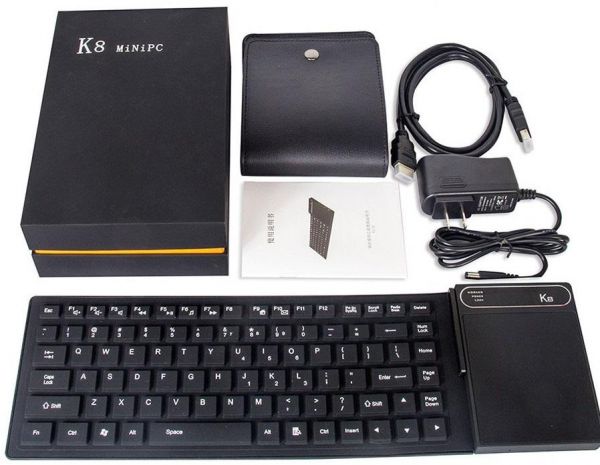
วันนี้เราจะมารีวิว K8 mini PC ที่มาพร้อมกับแป้นพิมพ์และทัชแพดที่กันน้ำและยืดหยุ่นสุดๆ ซึ่งในจุดนี้นั้นคุณไม่ได้สามารถแค่ใช้เจ้าตัวนี้ที่บ้านเท่านั้นแต่สามารถพกไปออฟฟิศหรืออกทริปไปกับคุณได้เลย
K8 mini PC มาพร้อมด้วยIntel Atom x5-Z8300จากCherry Trail
ซึ่งเรามีต้วอย่างการใช้งานจริงจากวีดีโอข้างล่างท้ายบทความนี้ได้เลยครับ
สเปกของเจ้ าK8 Mini PC with Flexible Keyboar
CPU – Intel Atom x5-Z8300 “Cherry Trail” quad core processor @ 1.44 GHz / 1.84 GHz
GPU – Intel Gen8 HD graphics (2W SDP)
Memory – 4 GB DDR3L
Storage – 64 GB eMMC flash (option for 32GB) + micro SD slot up to 128GB
Touch Panel – 10 point capacitive touch panel
Keyboard – 87-key flexible QWERTY keyboard
Video Output – HDMI and VGA ports
Audio I/O – HDMI, 3.5mm headphone jack, built-in microphone
Connectivity – Dual band 802.11 b/g/n Wi-Fi, and Bluetooth 4.0 with external antenna
USB – 1x USB 2.0 host port, 1x USB 3.0 port
Misc – Power button; reset pinhole; power, standby LEDs
Power Supply – 5V/3A
Dimensions – 385 x 120 x 15 mm
และในกล่องที่ได้มาจะประกอบไปด้วยสิ่งเหล่านี้
K8 Mini PC with Keyboard & Touchpad
HDMI cable
Power adapter 5V/3A (EU)
Leather case
User Manual
หลายๆท่านน่าจะกำลังตั้งตารอ TV BOX จากค่าย xiao mi
ซึ่งเมื่อเร็วๆนี้ทาง xiao mi ได้เปิดตัว Mi BOX ซึ่งเป็น official intrnational version
ในส่วนของสเปกเครื่องน่าสนใจมากทีเดียวครับ
โดยตัวเครื่องมีขนาด 101 x 101 x 19.5 mm น้ำหนักเพียง 176.5 g เท่านั้นเอง
ใช้งานบน Android 6.0 TVและรองรับ DRM -Widevine L1 + PlayReady 3.0
สามารถใช้งานดูวีดิโอย้อนหลัง YouTube, Netflix, Hulu หรืออื่นๆได้ที่ความละเอียดสูงสุด1080pและ 4K
พร้อมด้วย RAM 2GB และหน่วยความจำ8GB
ซึ่งก็น่าจะตอบสนองต่อการใช้งานทั่วๆไปได้อย่างดีนอกจากดูหนังฟังเพลงแล้วยังสามารถเล่นเกมต่างๆได้อีกด้วย
CPU – Amlogic S905X-H quad core ARM Cortex-A53 @ up to 2.0GHz
GPU – with penta-core Mali-450MP GPU @ 750 MHz
Memory – 2GB DDR3
Storage – 8GB eMMC flash
Video Output – HDMI 2.0a up to 4K @ 60 Hz with HDCP 2.2 and CEC support
Audio Output – HDMI, optical S/PDIF and 3.5mm audio jack
Video Codecs – VP9 Profile-2 & H.265 MP-10 up to 4K @ 60 fps, H.264 AVC up to 4K @ 30 fps, H.264 MVC up to 1080p60
Audio Codecs – DTS 2.0+ digital out, Dolby digital plus up to 7.1 pass-through
HDR – HDR10 and HLG HDR processing
Connectivity – 802.11 b/g/n/ac Wi-Fi and Bluetooth 4.0
USB – 1x USB 2.0 host ports
DRM – Widevine L1 + PlayReady 3.0
Power Supply – 5.2V/2.1A
Dimensions & Weight – 101 x 101 x 19.5 mm
Weight – 176.5 g
ภายนอกตัวเครื่องนั้นมีรูปทรงที่สวยงามน่าใช้เลยทีเดียว (ได้รางวัล Red Dot Design Award และ GOOD DESIGN AWARD)และตัวรีโมทเป็บแบบ บูลทูธที่สามารถใช้ voice control ไดโดยใช้ถ่านไฟฉายขนาด AAA เพียงสองก้อนเท่านั้น
SoC – Rockchip RK3399 hexa-core bit.LITTLE processor with dual core Cortex A72 up to 2.0 GHz and quad core Cortex A53 processor with ARM Mali-T860MP4 GPU with OpenGL 1.1 to 3.0 support, OpenVG 1.1, OpenCL and DX 11.
System Memory – 2 to 4 GB DDR3
Storage – 16 to 32 GB eMMC flash + micro SD card
Video Output & Display Interfaces – HDMI 2.0 up to 4K @ 60 Hz, eDP 1.2 interface, YUV interface, 1x MIPI DSI interface
Video Decode – 4K VP9 and 10-bit H.265 video codec support up to 60 fps
Hi Media Q5 Pro และ Hi Media Q10 Pro ออกเฟิมแวร์ Android Version ใหม่ออกมา คือ N หรือ V.7.0
วิธีอัพเดดรายละเอียดตามด้านล่างนี้ครับ
หรือติดตามได้ที่ Forum
The majority of TV boxes sold today are running Android 4.4 to Android 6.0, but with the release of Android 7.0 for smartphones and tablets earlier this year, it was just a question of time before the OS got ported to TV boxes. Himedia appears to be the first company to have released Android 7.0 for their Hisilicon Hi3798CV200 based TV boxes, namely Q5 Pro and Q10 Pro.
The changelog for the new firmware includes:
Android N OS running stable and smooth
Support for Android N Google Play version
Support for Samba UPnP
System function perfectly upgraded from 5.1 to Android N with compatibility
Youtube updated to 4.10.7 and Netflix to 1.3.11
Homepage, Application Management, Media Center optimized, focus movement are more swift and smooth
Media Player upgraded and support mouse operation
Local Media Playback Improved; Certain rare videos black screen, display ratio of 3D to 2D abnormal, and occasional subtitle defect issues fixed
Blu-ray video slow loading conditions improved and speed up
Local Audio output improved and certain audio tracks unable to decode and output issue fixed
Revised some UI language
Support for Widevine L3
I assume most users are running Android 5.1.1 right now, but for those who are using an Android N beta version, a different firmware file is required
The update procedure is basically the same as most others Android TV boxes on the market:
Download a new firmware and copy the file update.zip) to the root directory of a USB drive.
Plug the USB drive into the TV box
Go to Settings→System→System upgrade to select/click the letter of the USB drive.
The TV box will then begin upgrading the firmware from the USB drive.
Wait for the TV box to complete the upgrade. Please be patient, as it may take around 5 minutes to complete.
The TV box will then automatically reboot, and boot to Android N Final
Just bear in mind that changing Android version often leads to some new bugs, even though the company claims “perfect compatibility” and that everything is running “stable and smooth”.
HDR, 10-bit HEVC/H.265 up to 4K @ 60fps, VP9 up to 4K @ 60 fps, H.264 up to 4K @ 24 fps, automatic frame rate switching
Audio decode
Support HD audio(7.1ch) decode and passthrough Redesigned Native player,Blu-ray better compatibility,Powerful subtitles ,Support MVC ISO,MVC MKV. Built in ZDMC(Base on kodi 16.0)
USB
1 * USB3.0 2 * USB2.0
Power
12V/3A
other interface
1 * TF card reader SD card interface . Support 1GB/2GB/4GB/8GB/16GB/32GB 1 * IR receiver 1 * Composite video and audio port (Cvbs output) 1 * S/SPDIF (2CH, 5.1CH) 1 * In Bay SATA 1 * VFD display